© 2026 InterSystems Corporation. All rights reserved.Privacy & TermsGuaranteeSection 508Contest TermsCode of ConductModeration PolicyCookies Settings


iris-flightdeck 

Community Project
This project is maintained by its author and is not officially supported by InterSystems. For technical support, please contact the project developer.
This project is maintained by its author and is not officially supported by InterSystems. For technical support, please contact the project developer.
5
2 reviews
0
Awards
201
Views
0
IPM installs
 0
0 Add to bundle
Details
Releases (2)
Reviews (2)
Issues
Videos (1)
Articles (2)

FlightDeck: a keyboard-first, safe-by-default management portal for InterSystems IRIS, built on the official SysAdmin API.
What's new in this version
Initial Release
FlightDeck for InterSystems IRIS
- Try it: the live demo at http://109.123.244.170/ —
demo/AZVB8skQvGzRuS5tFDc6Xki9, ordemo_reduced/etdhb0l76Dls13B76UzWcqRofor a non-administrator. A real IRIS instance, not a simulator, rebuilt every hour. - Install it: one command,
docker compose up -dafter cloning — orzpm "install iris-flightdeck", version 1.0.1, on Open Exchange. - What it covers: all 273 official SysAdmin API operations, by domain.
- What has actually run: functional coverage — 138 verified by an independent read-back, 91 exempt by name, 39 still open, with the gate red on purpose.
- Watch it: the demo video, the portal driven against a real IRIS instance.
It changes the instance, not only displays it, on all six axes the contest names — logs and security
included. Every change is rehearsed first, as a field-by-field difference and the users it
would affect, and applied only after you confirm it. The protections that keep the portal from
damaging the instance or itself are enforced by the server, so a request sent directly, bypassing
the interface, is refused the same way.

FlightDeck is a keyboard-first management portal for InterSystems IRIS that ships as a container you
can run in one command: you drive it from a command palette, every browser tab starts read-only, and
every change is shown to you first — the exact fields that would change and the users who would lose
access — and only applied once you confirm. It is built entirely on IRIS’s official SysAdmin API
(the REST management API under /api/admin), so what you can see and do is exactly what your own
IRIS account is allowed to see and do, and your password is never stored by any part of it.
The demo video walks through the portal against a real IRIS
instance. To try the same steps yourself, follow the tour on the live demo.
Install
Requirements
- Docker Engine 24+ with Docker Compose v2. Linux, macOS and Windows (including WSL2).
- About 3 GB of free disk space for the IRIS Community image, 5 GB for IRIS for Health.
- A free port — 52780 by default, and any other port works (see below).
- x86-64 or arm64. The images are multi-architecture, so Apple Silicon runs them natively, with
no emulation.
One command, after cloning
git clone https://github.com/kcedd34/iris-flightdeck.git
cd iris-flightdeck
docker compose up -d      # the install
docker compose logs -f iris
This pulls intersystemsdc/iris-community:2026.2-zpm, pinned in docker-compose.yml, and builds
a small image on top of it that adds FlightDeck. So the default install gives you the full
portal, not the limited mode described under Compatibility — you have to ask for
an older IRIS to get that.
Wait for this line — about 15 seconds after the first build, which itself takes a few minutes while
the base image downloads:
FlightDeck is ready at http://localhost:52780/flightdeck/ — sign in with the default account documented in the README (local evaluation only).
Open http://localhost:52780/flightdeck/ and sign in with _SYSTEM / SYS, the default account
of the InterSystems Community image. FlightDeck creates and changes no credential. Use it for local
evaluation only.
FlightDeck installs into the USER namespace and does not replace the InterSystems Management
Portal — it runs beside it, on the same instance, and points you back to it for the few operations it
declines to perform.
This container also creates the demonstration objects, so that every screen
has something to show on first open. One of them, /csp/fd-demo, is deliberately unauthenticated
— it exists so the exposure warning has something real to point at. That is fine on a throwaway
container bound to your own machine, and it is the reason the IPM path creates nothing of the sort
unless you ask.
Then try these three, in order — they are the portal in ninety seconds:
- Press Ctrl+K (Cmd+K on macOS — FlightDeck takes the
shortcut from the browser while the portal has focus) and typeFD_Demo. The demonstration
roles, resources, web application, tasks and wallet collection appear, grouped by domain. - Type
deleteand press Enter on “Delete a role” — the palette matches against the
names of objects and actions, so a fragment is enough. FlightDeck offers to turn off safe mode
first, because this tab is read-only. Turn it off and chooseFD_Demo_Operator: before anything
happens you get the fields that would change, the users who would lose access, and a confirmation
that asks you to type the role’s name. Cancel it — nothing has been sent. - Open a second tab. It starts in safe mode again: safe mode is per tab and never remembered.
To stop: docker compose down. To remove everything including IRIS data: docker compose down -v.
If the ready line never appears, or sign-in refuses you, see Troubleshooting.
On IRIS for Health — the same procedure, one variable. --build is needed here and not above
because the local image has already been built on top of IRIS Community, and changing the base means
rebuilding it:
docker compose down -v
IRIS_IMAGE=intersystemsdc/irishealth-community:2026.2-zpm docker compose up -d --build
If the port is already in use, docker compose up -d stops with a message like this one —
Docker’s exact wording varies by version, but it always names the port:
Error response from daemon: failed to set up container networking: driver failed programming
external connectivity on endpoint iris-flightdeck-iris-1: failed to bind host port
0.0.0.0:52780/tcp: address already in use
Pick another one. Nothing else changes, and the ready line shows the new URL:
FLIGHTDECK_PORT=52790 docker compose up -d
That syntax is POSIX shell. In PowerShell or cmd, or whenever you would rather not repeat the
variable, put it in a .env file next to docker-compose.yml — Compose reads it automatically:
FLIGHTDECK_PORT=52790
Putting it on a network
The install binds to localhost only. FlightDeck is an administration portal and this install
signs in with the Community image’s documented default account, so on a machine with a public
address, publishing it on every interface would put full administrative access to that IRIS on the
internet. Locally nothing changes — the portal is at http://localhost:52780/flightdeck/ either way.
If you do want it reachable from elsewhere:
FLIGHTDECK_BIND=0.0.0.0 docker compose up -d
Before you do, at least: change _SYSTEM‘s password, and put it behind something that terminates
TLS. deploy/vm/ in this repository is a worked example — a reverse proxy that forwards only
FlightDeck’s own two paths and answers 404 to the rest of IRIS, an unprivileged container with no
bind mounts, and a restricted egress rule. It is what runs the public demo.
Install with IPM on an existing instance
The current version is 1.0.1, published on Open Exchange and in the public IPM
registry (iris-flightdeck).
This path needs IPM (ZPM) already installed on the instance — the -zpm Community images carry it.
On IRIS 2026.2 or later (2026.1 installs in limited mode), in the namespace where you want
FlightDeck:
zpm "install iris-flightdeck"
iris-flightdeck is the package name; the portal it installs is FlightDeck. From a clone of this
repository rather than the registry, the same install runs from the working copy:
zpm "load /path/to/iris-flightdeck"
This installs two web applications — /flightdeck for the interface and /api/flightdeck for the
API, with Password authentication — a role FlightDeck_Runtime granting read access to FlightDeck’s
code database inside those two applications only, and a small capture routine in %SYS. Nothing else
is created or changed.
On an instance older than 2026.1 there is no SysAdmin API at all: FlightDeck installs, and sign-in
refuses with the version it detected rather than half-working.
Demonstration objects are off by default on this path. To add them:
zpm "install iris-flightdeck -DDemo=1"
⚠️ -DDemo=1 creates /csp/fd-demo, a deliberately unauthenticated web application, so that the
exposure warning has something real to point at. That is what you want on a scratch instance and not
what you want on a shared one. Without the flag, nothing of the sort is created.
The installer creates the role and every demonstration object through the SysAdmin API. The
installing user needs %All, or equivalent rights for the web applications and the %SYS routine.
Try it without installing anything
There is a public demo at http://109.123.244.170/.
It runs against a real InterSystems IRIS Community instance, not a simulator: every operation you
perform there is executed against the platform, which is why the instance is rebuilt every hour.
Two accounts are published, here and on the demo’s own sign-in form:
| User | Password | What it shows |
|---|---|---|
demo |
AZVB8skQvGzRuS5tFDc6Xki9 |
Full administrator: every domain and every operation this IRIS offers. |
demo_reduced |
etdhb0l76Dls13B76UzWcqRo |
Reduced privileges — the stock %Operator role and nothing else. 57 of the 273 operations are offered; the rest are disabled naming the privilege they need, and Permissions and Web applications cannot be opened at all. It is the capability map with something to show, which the first account cannot do because an administrator holding %All never sees a disabled control. |
These are not the credentials above. The local Docker install signs in with _SYSTEM / SYS,
the InterSystems Community image’s own default. The demo instance has a different administrative
password that exists only on that machine, and both accounts you are given there are separate ones.
Four things are true of that demo and are worth knowing before you judge it:
- It is rebuilt every hour, from nothing. Anything you change is discarded, and that is
deliberate: the first account holds%All, because permissions and security are the part
of this portal worth looking at — the impact analysis, the last-administrator predicate, the
dry-run with provenance — and a read-only account would hide exactly that. Recovery replaces
restriction: a watchdog checks every five minutes that a visitor can still sign in with both
accounts, and rebuilds immediately if not. - It is shared. Someone else may be looking at the same instance while you are.
- It is plain HTTP, with no certificate. Treat anything you type there as public. Do not use a
password of yours on it. - It is a disposable machine that runs nothing else.
If you want an instance that is yours, with nothing shared and nothing reset, the one-command install
above takes a couple of minutes.
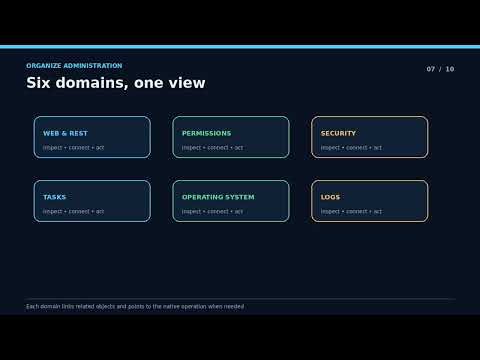
The six domains
- Web applications and REST APIs — every web application with a graded exposure marker, edited
through a field-by-field rehearsal; every REST service the instance serves, discovered with its
OpenAPI specification and callable from the browser. - Permissions — users, roles, resources, services and privileged routines, each privilege shown
with the chain of roles that grants it, and each removal preceded by who loses what. - Security and secrets — TLS, X.509, OAuth 2.0 in its three roles, the wallet, LDAP, MFT,
auditing, web authentication and superservers; secrets are set or replaced, never shown. - Tasks — the task list with each task’s recent history, run, suspend, resume and reschedule, and
a jump from a failed run to the logs of that period. - Operating system — processes, databases, directories, namespaces, devices, licence, locks, web
sessions, ECP, external language servers, DocDB and file-system access, with a live instrument
cluster above them. - Logs — five sources in one stream under a single normalised schema, live follow, a jump from an
event to the entity it names, and the original record behind every line.
What makes it different
- A command palette, not a menu tree. Ctrl+K from anywhere finds any user,
role, web application, task or action by name, grouped by domain, and opens it in the inspector.
Every destination in the portal is reachable without the mouse.

- An entity graph, not isolated forms. Objects link to the objects they affect: a role to the
users who hold it and the resources it grants, a web application to its roles and REST services, a
log event to the process, namespace or user it names. You follow a question instead of re-finding
each object by name. - A dry-run with impact analysis before every change. Current and commanded values side by side,
the effect on users when it can be determined, confirmation graded by risk — destructive changes
ask you to type the target’s name — and the server recomputes the whole preview and refuses if the
object moved underneath you.

- Safe mode, per tab, enforced by the server. Every tab starts read-only, and turning it off
applies to that tab alone — never shared, never remembered. The API rejects a change from a
read-only tab before it reaches IRIS, so the guarantee does not depend on the interface. - One unified log stream, where the official API offers almost nothing. Of the five places IRIS
reports what happened, the SysAdmin API covers two. FlightDeck reads the audit trail and the
journal through it, and implements the messages log, the alerts log and the interoperability event
log natively, normalising all five into one line that keeps every original record. This is the part
of the portal that could not be assembled from the API alone.
A tour
The demo video shows these steps. Each one works on the live demo signed in as demo, and on
a local install signed in as _SYSTEM. Nothing in it is simulated: every screen reads the instance,
and every change you confirm is applied to it.
-
The instrument cluster. Open it from the palette. CPU and memory are read from the host, shared
memory and disk from the SysAdmin API, once a second; the trailing series fills as you watch and
lives only in the tab. -
The palette. Ctrl+K,
FD_Demo: roles, resources, a web application,
tasks and a wallet collection, grouped by domain. Every destination below is reachable from here. -
A rehearsed deletion. Open
FD_Demo_Operator, turn off safe mode for this tab, press
Delete. The rehearsal shows the fields that would change, the users who would lose a privilege
and which one, and asks you to type the role’s name. Cancel, and nothing has been sent. Confirm,
and the server recomputes the rehearsal before applying it, refusing if the role changed since you
read it. -
Safe mode. Open a second tab: it starts read-only. The server refuses a change from it before
anything reaches IRIS. -
Web applications and REST.
/csp/fd-democarries the No authentication marker. In the REST
explorer, runGET /api/flightdeck/v1/session/capabilities: it is dispatched in-process, as you,
and the panel shows status and time. -
Permissions. Open a privilege held through
FD_Demo_L1→FD_Demo_L2→FD_Demo_L3and read
the chain that grants it. The account list marks disabled and expired accounts. -
Self-protection. Try to disable
/api/flightdeck: the server refuses and says why. It refuses
the same way a change that would leave no enabled account with administrative access. A daemon’s
Terminate is disabled with the instance’s own answer beside it.
scripts/dev/check-mutation-enforcement.shsends the safe-mode and own-application refusals
straight to the API, with no interface involved.
-
Security and secrets. Set a secret in
FD_Demo_Vault: it is never shown again, anywhere. The
encryption writes are disabled, each naming its reason and the native path that performs it. -
Tasks.
FD Demo failing taskfails on purpose. From a failed run, open the logs of this
period opens the stream filtered on that task and that window, and says so. -
Logs. Five sources under one schema, each saying how much it read. A line whose source states
no level readsunknown, not a guess. Open an event for the original record behind it, then turn
on live follow. On this axis you can also change the journal settings, switch the journal file and
define audit events, through the same rehearsal.
-
The session trail. Open it from the palette by name: what this tab applied and what was
refused, each with its reason. Export it as JSON; secret fields appear as changed or unchanged,
never as values. -
The reduced account. Sign in as
demo_reduced, which holds only%Operator: 57 of the 273
operations are offered, and every other control is visible, disabled, naming the privilege it
needs.
Compatibility
FlightDeck needs the official SysAdmin API — v2 for the full portal, v1 for a reduced one — and
reads capability from the API’s own declarations rather than from a version number: an operation the
instance does not offer is a disabled control with the reason on it, never a missing screen.
| IRIS version | Channel | Offered to you | Not offered by that IRIS | Declined by FlightDeck | Total |
|---|---|---|---|---|---|
| IRIS 2026.2 | latest-cd |
262 | 0 | 11 | 273 |
| IRIS 2026.1 | latest |
200 | 62 | 11 | 273 |
“Not offered by that IRIS” is what the instance’s own API does not expose; “Declined by FlightDeck”
is what the portal refuses to do on every version. These numbers were read from a
running instance of each, and you can reproduce them on yours:
curl -s -u _SYSTEM:SYS -H 'X-FlightDeck-Tab: check' \
  http://localhost:52780/api/flightdeck/v1/session | grep -o '"capabilitySummary":{[^}]*}'
(The v1 there is FlightDeck’s own API version, not the SysAdmin API’s. The header can be any
string: FlightDeck’s API requires each browser tab to identify itself, which is how safe mode is
scoped to one tab.)
IRIS for Health Community Edition 2026.2 reports the same numbers as IRIS 2026.2.
Implemented is not the same as exercised. Of the 268 operations across the six domains, 138 are
executed by a test that then reads the result back from the instance through the official API, 91 are
exempt by name with a written reason, and 39 have no such test yet — which is why
check-functional-coverage is red. The breakdown, operation by operation, is in
https://github.com/kcedd34/iris-flightdeck/blob/001-foundation-shell/https://github.com/kcedd34/iris-flightdeck/blob/001-foundation-shell/verification/functional-coverage.md.
IRIS 2026.1 runs in limited mode. That release — still the latest tag of the Community images —
exposes API v1 only. FlightDeck translates what v1 offers, shows a persistent Limited indicator,
and disables the rest with the reason on each control. Namespaces are still browsable, read through a
native provider because v1 has no endpoint for them.
An instance with no SysAdmin API at all refuses sign-in and says so, naming the version it detected.
Why disabled controls name a version, if nothing checks one. FlightDeck never asks the instance
what release it is in order to decide what to offer: it asks the API what it declares, and an
operation that is absent is disabled. The sentence on the disabled control names the release that
first shipped the operation, because “Requires IRIS 2026.2” is more useful to a reader than “this
instance does not declare this operation”. The version is in the message, not in the decision.
The REST test executor
- Confined to this instance. A test request names a method, a path, query parameters, headers and
a body. Scheme, host and port always come from the instance serving FlightDeck. Paths carrying a
scheme, a host,..segments (plain or percent-encoded) or backslashes are refused, and so are
Authorization,Cookie,Proxy-AuthorizationandHostheaders. The executor is not an
outbound proxy: it opens no network connection at all. The request is dispatched in-process to
the REST application that serves the path. - Runs as you. The request runs with your IRIS identity, in the application’s namespace, and only
if the application is enabled and you hold its resource. Your roles are kept or reduced, never
raised: when an application grants extra roles to real callers, a test request does not receive
them, and the result can differ from a real call. The explorer says so before and after running. - Safe mode applies.
GET,HEADandOPTIONSrun directly.POST,PUT,PATCHand
DELETEare refused by the server while the tab is read-only; otherwise they open the shared
confirmation showing exactly what will be sent, and are recorded in the session trail. - Copy as curl produces a command targeting this instance, carrying the literal placeholder
-u '<user>:<password>'and never your credentials.
What FlightDeck declines to do
Eleven official operations are implemented nowhere in FlightDeck by decision, on every version.
They appear as disabled controls stating the reason and the native path that performs them, and
https://github.com/kcedd34/iris-flightdeck/blob/001-foundation-shell/docs/api-coverage.md lists them as declined. They share one property: the portal can neither
rehearse them nor undo them.
- Encryption writes — 8 operations. Creating an encryption key file, adding or removing its
administrators, adding or removing keys, activating and deactivating a key, and changing the
encryption settings. A mistake here can make an instance’s data permanently unreadable, and a
deleted key cannot decrypt what it encrypted. Native path: System Administration > Encryption. - Destructive storage writes — 3 operations. Truncating a database directory, deleting a
database, and deleting a namespace. FlightDeck creates databases and namespaces but deletes
neither, because deletion removes data with no recovery from the portal and no safe way to show you
first what it would cost. Native path: System Administration > Configuration > Local Databases and
> Namespaces.
The journal is a different decision, and a more interesting one. Three of the five log sources
exist precisely because the official API offers nothing for them, so a missing operation is normally
a candidate for a native provider. The journal is where that stops. On IRIS 2026.1 the journal
operations are withheld by the platform, and FlightDeck does not read journal records natively to
fill the gap:
FlightDeck does not read the journal natively: filtering records by the databases you can read is
an authorization decision that belongs to IRIS.
Implementing it would mean the portal deciding which records you may see. That decision belongs to
the platform, so on that version the journal source says why it is absent and the other four keep
streaming.
Demonstration objects
Created on the Docker install, and with -DDemo=1 on IPM. Every object is created through the
SysAdmin API, and re-running creates no duplicates.
| Kind | Name |
|---|---|
| Resources | FD_Demo_Reports, FD_Demo_Billing |
| Roles | FD_Demo_Operator, FD_Demo_Auditor, and the chain FD_Demo_L1 → FD_Demo_L2 → FD_Demo_L3, so a privilege can be shown with the roles that grant it |
| Web applications | /csp/fd-demo, intentionally unauthenticated so the exposure warning has something to show, and /csp/fd-demo-reports |
| Tasks | FD Demo daily no-op, FD Demo nightly no-op, FD Demo failing task (fails on purpose) |
| Wallet collection | FD_Demo_Vault, holding one secret, FD_Demo_Token — set on install and never readable afterwards |
How sign-in and safe mode work
- Credentials. The sign-in form sends your username and password to IRIS once, in an HTTP Basic
header. IRIS authenticates you and keeps its own session cookie. FlightDeck never stores, caches or
logs the password, and uses no JWT or refresh token. Invalid credentials always produce the same
message, whether or not the user exists. - What you can do. Every SysAdmin API operation declares the privilege it needs (for example
%Admin_Secure:U). FlightDeck crosses those declarations with the privileges IRIS reports for you.
Actions you cannot perform stay visible, disabled, with the privilege to ask for. - Safe mode. Safe mode lives in the tab’s memory only — not in cookies, storage or the URL — so
reloads, new tabs and duplicated tabs always start read-only. Every request carries the tab’s
state, and the FlightDeck API rejects any change request from a read-only tab before it reaches
IRIS. - Changes. Every change opens the same confirmation: current and commanded values side by side,
graded confirmation, and the effect on users when it can be determined. The server recomputes the
preview and refuses if the object changed in the meantime. FlightDeck refuses changes that would
disable its own applications or remove the last administrative access to the instance. - Session trail. Applied, failed and blocked changes are recorded in a trail you can open from
the confirmation view or the palette and export as JSON. It is local to the browser tab, holds no
secret values, and does not replace IRIS auditing. - Users without administrative privileges cannot open a session. FlightDeck lists the privileges
they would need.
What the permissions screens claim, and what they do not
- Every privilege comes with its origin. A privilege is never shown without the chain of roles
that grants it, and a chain FlightDeck could not expand is reported as not expanded, not omitted. - Delegated access and LDAP are not enumerated. The official API does not report which roles an
account receives from them, so FlightDeck marks the account and says it does not manage them there. - SQL privileges are read as the platform reports them. The official listing already resolves
provenance through roles (Role:<name>,Owner Privilege), so FlightDeck renders that and does
not compute a second answer. - Before a change that could remove administrative access, FlightDeck checks whether any enabled,
unexpired account would still hold%Admin_Secure:USEor the%Allrole. If it can read what it
needs and the answer is none, the change is refused, and the reason says what was counted. If it
cannot read what it needs, it does not refuse and does not pretend: it says the check was
incomplete, names what it could not read, and asks for the reinforced confirmation. The session
trail records which of the two happened.
Secrets
- Secret material is write-only everywhere: wallet secrets, private keys, client secrets,
passwords and tokens are set, replaced or deleted. No screen, API answer, session trail or log of
FlightDeck carries a value, and the wallet has no operation that reads one back. - Auditing. FlightDeck changes the setting and performs the two writes that touch the audit trail
— copying records to another namespace, and purging them. A purge asks for the maximum confirmation
and states that it erases the instance’s own audit trail. Reading audit records belongs to the logs
screens.
What the log stream reads, and what it does not
- Five sources, one schema. Two come from the official API — the audit trail and the journal,
both read asynchronously; three have no API and are read natively: the instance’s messages log, its
alerts log, and the interoperability event log. - The original record is always kept. Normalisation discards nothing, so an event either shows
you the record it came from, or — when that record can no longer be recovered, a purged journal
file or a rotated log — says so in the record’s place and keeps the fields FlightDeck read before
it went. Those two are the only cases: nothing is ever invented to fill the gap. - Severity is mapped, never guessed. The scale is
info,warning,error,fatal. Each
source states its own level and FlightDeck maps it onto that scale. A source that states no level
gets a fifth value,unknown, which sits outside the ordering — notinfo, and never a guess from
the words in the message. The minimum-severity filter says how it treats it. - Big files are read backwards, in pages. A log is never read whole, at any size: each page seeks
to an offset near the end and reads one bounded window. A 100 MB file pages at the same cost as a
small one, wherever in it you are. - A source that cannot be read says why, and the others keep streaming. A stock instance writes no
alerts log, so that source is normally absent and explains what an alerts log is and where it comes
from. - What it is not. FlightDeck does not store, index or forward any event: nothing is persisted, and
the live window lives in the browser. It is a reader, not a log platform.
Where FlightDeck uses Embedded Python, and why
One class: FlightDeck.Native.HostMetrics, the provider that reads host CPU and host memory. It is
written in Embedded Python because reading /proc/stat and /proc/meminfo is filesystem access
and text parsing, which is Python’s natural work and not ObjectScript’s.
This is not a feature added to use a language. It is the same reading, moved to the language that
suits it, and the move paid for itself in the only way that counts — code removed:
| Before, in ObjectScript | After, in Embedded Python |
|---|---|
A sequential device opened by hand, read line by line, with the device closed and $io restored in every path — because %Stream.FileCharacter reads nothing from procfs, where every file reports size 0 |
with open(path) as handle: … |
$piece/$zstrip walking the text with whitespace collapsed by a "<=>W" strip |
str.split() and str.partition(":") |
A whole ReadFile helper whose only reason to exist was that workaround |
Deleted |
What stayed in ObjectScript, deliberately: the %Status contract its callers expect, the previous
CPU sample held in the session, and the arithmetic — because the published percentages are rounded
with $normalize, and moving that would have changed values that are checked against free and
top. Python reads and parses; ObjectScript keeps what is its own.
No version is tested anywhere in it. Embedded Python needs IRIS 2021.2 or later, far below the
2026.1 FlightDeck itself requires, so any instance that can run this portal has it. And if the Python
runtime should fail regardless, every entry point degrades through the status the class already
returned: the vital is marked unavailable with its reason, like any other capability that is absent,
and the screen does not break.
Everything else — the log readers, the REST executor, the whole domain layer — remains ObjectScript,
because none of it is filesystem or text work.
Day-1 platform verification
scripts/verify/verify_platform.py checks, in order, the eight platform facts FlightDeck depends on:
SysAdmin API v2; which sign-in path works without storing credentials; monitor data shapes;
asynchronous database metrics; the wallet; the REST management API; log file locations and the
interoperability log; and auditing.
Each fact is classified confirmed_present, confirmed_absent or inconclusive, with the raw
response recorded. You do not need to run it — the reports it produced are committed — but if you
want to:
scripts/verify/run-both-images.sh
It needs Python 3, starts and removes its own throwaway containers on ports of its own, and does
not touch the install you are running or the data in it.
Reports are written to https://github.com/kcedd34/iris-flightdeck/blob/001-foundation-shell/verification/<product>-<version>.json. Exit code 0 when nothing is
inconclusive, 1 otherwise, 2 for a usage error. The committed reports are in
https://github.com/kcedd34/iris-flightdeck/blob/001-foundation-shell/verification/, and what the platform answered is summarised, with the raw
responses, in the platform findings.
Checking what this README claims
Every assertion here is enforced somewhere, because a claim nobody can check is a claim that drifts.
| Claim | Where it is enforced |
|---|---|
| The operation counts, and that every operation is implemented or declined for a stated reason | scripts/build/check-coverage.py, in the build: it fails naming any operation of a shipped domain that no code reaches and no policy declines, and it keeps no list of tolerated gaps |
| That an implemented operation has actually been executed, with its effect read back from the instance | scripts/build/check-functional-coverage.py, run after the end-to-end suite: it reads the record those tests write and fails naming every operation no test executed with an independent read-back. It is red today, on purpose — see https://github.com/kcedd34/iris-flightdeck/blob/001-foundation-shell/https://github.com/kcedd34/iris-flightdeck/blob/001-foundation-shell/verification/functional-coverage.md |
| This README’s own structure and numbers | scripts/build/check-readme.py, in the build |
| No credential stored, cached or logged; no secret in any response, trail or export | frontend/e2e/audit.spec.ts and secrets.spec.ts sweep the responses and the exports; scripts/build/check-secrets.py fails on an undeclared secret field |
| Safe mode is enforced by the server, not the interface | scripts/dev/check-safe-mode-enforcement.sh sends every mutating route directly, bypassing the interface, and requires each to be refused |
| Every mutation goes through the one confirmation path | npm run check:mutation-boundary and scripts/dev/check-mutation-enforcement.sh |
| The REST executor opens no outbound connection | frontend/e2e/rest-confinement.spec.ts |
| A 100 MB log pages at constant cost | Measured and recorded in https://github.com/kcedd34/iris-flightdeck/blob/001-foundation-shell/verification/feature-005-signoff.md |
| It runs on both Community images, from clean | https://github.com/kcedd34/iris-flightdeck/blob/001-foundation-shell/verification/install-runs.md, one entry per install |
| That the three installs in the compatibility table above really were three products, each serving this build | scripts/build/check-matrix-identity.py, run after the end-to-end matrix: each run records what /api/admin/info says it is and the hash of the bundle that instance served, and the gate fails naming any install that never ran or answered with different assets. A port does not identify a product and neither does a docker tag |
Troubleshooting
- The ready line never appears. Look for a line starting with
FLIGHTDECK INSTALL FAILED:in
docker compose logs iris. It names the step and the IRIS error. IRIS stays running so you can
inspect it. - Sign-in says “Not available on this IRIS version or edition. Requires IRIS 2026.1.” The
instance has no SysAdmin API at all. Use the pinned images, or upgrade. - The top bar shows “Limited”. The instance is IRIS 2026.1, for example a
latestCommunity
image. Disabled actions say “Requires IRIS 2026.2”; use the pinned images for the full portal. - Sign-in says “Invalid credentials”. The default account is
_SYSTEM/SYSon the Docker
install. On an existing instance, use your own IRIS account. - Sign-in says “Requires Use on …”. The account has no administrative privilege. Grant one of the
listed%Admin_*resources, for example through the%Operatoror%Managerrole.
Development
| Area | Command |
|---|---|
| Frontend dev server (proxies the API to the Docker install) | cd frontend && npm ci && npm run dev, then open http://localhost:5173/flightdeck/ |
| Frontend checks | npm run lint && npm run check:tokens && npm run check:dialect && npm run contrast && npm run test |
| End-to-end tests (Docker install running) | npx playwright install chromium && npm run e2e |
| Backend unit tests (inside the container) | docker compose exec iris iris session iris -U USER, then zpm "iris-flightdeck test" |
| Rebuild the committed frontend bundle | cd frontend && npm run build (verify with scripts/build/check-dist.sh) |
| Regenerate the capability map from the official spec | python3 scripts/build/gen-capability-spec.py (verify with scripts/build/check-generated.sh) |
| Regenerate the documentation images | cd frontend && FD_CAPTURE=1 npx playwright test --project=docs |
Specifications, plans and research for all six features live in https://github.com/kcedd34/iris-flightdeck/blob/001-foundation-shell/specs/. The project
constitution is in https://github.com/kcedd34/iris-flightdeck/blob/001-foundation-shell/.specify/memory/constitution.md.
License
MIT. See https://github.com/kcedd34/iris-flightdeck/blob/001-foundation-shell/LICENSE.
 Donate
 Last checked by moderator
02 Oct, 2026, Works
Checked on IRIS for UNIX (Ubuntu Server LTS for x86-64 Containers) 2026.2 (Build 221U) Fri Jun 26 2026 09:58:52 EDT
Made with
Install
 zpm install iris-flightdeck
  download archive
 Version
1.0.121 Sep, 2026
Category
SolutionsWorks with
InterSystems IRISInterSystems IRIS for HealthFirst published
19 Sep, 2026Last edited
02 Oct, 2026