

© 2026 InterSystems Corporation. All rights reserved.Privacy & TermsGuaranteeSection 508Contest Terms

pi-review 

Community Project
This project is maintained by its author and is not officially supported by InterSystems. For technical support, please contact the project developer.
This project is maintained by its author and is not officially supported by InterSystems. For technical support, please contact the project developer.
0
0 reviews
0
Awards
2
Views
0
IPM installs
 0
0 Add to bundle
Details
Releases (1)
Reviews
Issues
AI Hub agent for patient identity review in IRIS workflows.
What's new in this version
Initial Release
PI Review
English | 简体中文

PI Review stands for Patient Identity Conflict Review Assistant.
An InterSystems IRIS interoperability demo in which an AI Hub agent investigates synthetic patient identity conflicts, gathers scoped source evidence and recommends a route for human review. A reviewer retains control of identity mappings; the agent cannot approve a merge.
Contest entry: InterSystems Programming Contest — AI Agents in Interoperability Workflows. This project shows how an AI Agent integrated into an IRIS production workflow can handle a high-stakes decision task — identity conflict resolution — with tool-constrained evidence collection, governance knowledge retrieval, and human-in-the-loop review.
This repository is a fresh installation. It contains no historical database, patient records, user credentials or EAP image. The source MCP server is implemented in ObjectScript on IRIS and exposed through native iris-mcp-server; a Python source service or SQLite database is not required.
Screenshots
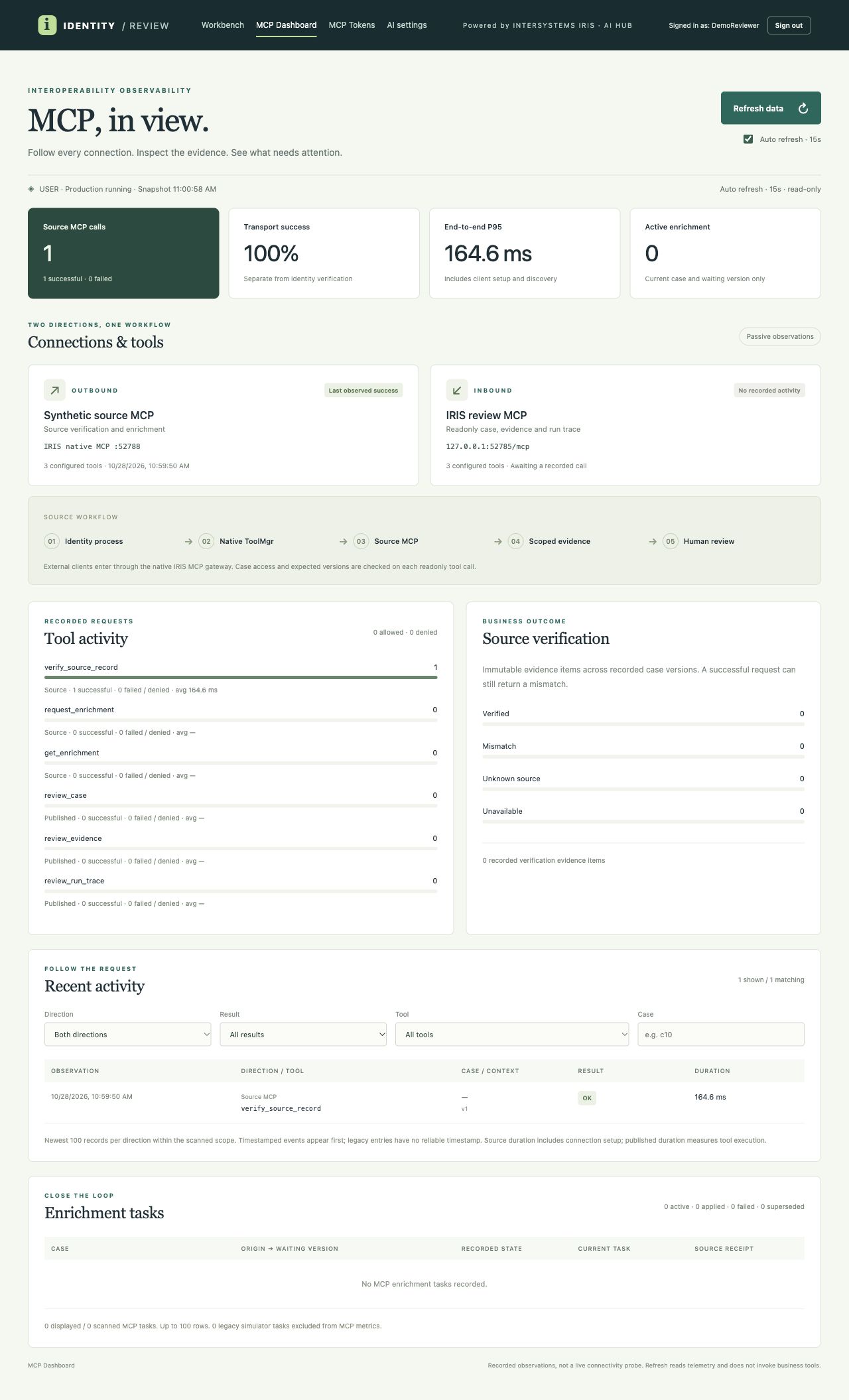
The screenshots below use synthetic demo cases in a local instance. The model is not configured in this example.
Identity review workbench

MCP dashboard

AI settings

Video demo: [TODO: add link to video walkthrough]
Contents
- Business workflow
- System architecture
- AI Hub and interoperability features
- IRIS Agentic Dev
- Requirements
- Start from an empty environment
- Configure a model
- Demonstration
- Verification
- Contributors
Business workflow
The diagram follows the implemented intake, investigation, enrichment and review paths. AI investigation is started explicitly; loading demo cases does not call a model.
flowchart TD
    A["Workbench input / FHIR R4 message"] --> B["Production intake: PI.Service → PI.Process"]
    B --> C["Store source snapshot and recall candidates"]
    C --> D{"Intake result"}
    D -- "Duplicate" --> E["Return existing result"]
    D -- "No candidates, no case; identifier and birth date present" --> F["Accept record; create a master if needed"]
    D -- "Candidates or incomplete fields" --> G["Create case: PENDING_AGENT"]
    D -- "Candidate limit / enrichment limit" --> R["Manual conflict review"]
    G --> H["Operator starts AI investigation"]
    H -- "Model not configured / timeout" --> R
    H --> I["AI Hub Agent collects case, governance and source evidence"]
    I --> K{"Policy and evidence validation"}
    K -- "LINK_REVIEW" --> L["Review proposed link"]
    K -- "SEPARATE_REVIEW" --> M["Review proposed separation"]
    K -- "NEEDS_DATA" --> N["Source enrichment: see detail below"]
    K -- "CONFLICT_REVIEW / validation failure" --> R
    L --> S["Human decision"]
    M --> S
    R --> S
    S --> T["Save review and update mapping when applicable"]
    T --> U["Simulated downstream notification"]
    T -. "Undo when eligible" .-> V["Restore mapping; return case to conflict review"]
The workbench shows the rule-based baseline separately from the agent recommendation, together with case-scoped evidence, source calls and review history. Source changes are checked again before applying a result. An unavailable source during investigation or enrichment request routes to conflict review; an error while fetching an update is returned to the caller and does not itself change the waiting case. Enrichment is limited to two rounds; a five-minute timeout is evaluated when the case list is refreshed. Undo is subject to case and source-version checks.
Enrichment detail
flowchart TD
    A["NEEDS_DATA"] --> B["Request enrichment through native MCP"]
    B -- "Request fails" --> R["CONFLICT_REVIEW"]
    B -- "Request succeeds" --> C["Operator fetches source update"]
    C -- "Fetch fails" --> D["Return error; case stays NEEDS_DATA"]
    C -- "WAITING" --> E["Remain waiting; fetch again later"]
    C -- "READY" --> F["Validate receipt and source version; ingest update"]
    F --> G{"Updated case status"}
    G -- "PENDING_AGENT" --> H["Ready for another explicit investigation"]
    G -- "CONFLICT_REVIEW" --> R
    C -. "Five-minute timeout checked on case-list refresh" .-> R
System architecture
flowchart LR
    UI["Review workbench"] --> API["REST / FHIR R4 endpoint"]
    API --> PROD["PI.Production: Intake → IdentityProcess"]
    PROD --> STORE["IRIS records, cases and audit"]
    PROD --> AGENT["AI Hub Agent + ToolMgr"]
    AGENT --> KB["Governance knowledge base"]
    AGENT --> SOURCE["Native source MCP gateway"]
    PROD --> SOURCE
    SOURCE --> FIXTURE["IRIS synthetic source: versioned fixtures and receipts"]
    API --> REVIEW["Human review and mapping"]
    REVIEW --> STORE
    REVIEW --> NOTIFY["Simulated notification"]
    CLIENT["Authorized MCP client"] --> PUB["Native readonly MCP publisher"]
    PUB --> STORE
The two MCP paths have different roles: the source MCP verifies synthetic source records and handles enrichment; the readonly publisher exposes authorized case, evidence and run-trace views to MCP clients. Both use IRIS-native MCP services behind iris-mcp-server gateways. The source service runs in the same IRIS instance as the application; it reads synthetic fixtures and stores request receipts in IRIS. It is not an independent hospital system.
MCP tools, ports and authorization
| Path | Tools | Gateway and access |
|---|---|---|
| Source MCP | verify_source_record, request_enrichment, get_enrichment |
A shared container-loopback gateway at 127.0.0.1:52788/mcp serves USER and PITEST; it is not published as a host port. |
| Readonly publisher | review_case, review_evidence, review_run_trace |
Host loopback 127.0.0.1:52785/mcp by default; PI_MCP_PORT changes the host port. The test publisher uses PI_MCP_TEST_PORT and the test Compose profile. |
For source calls, the business code uses %AI.ToolMgr to call the local gateway. The client and source service share the source Bearer credential; USER and PITEST use different HMAC signing keys. A short-lived signed capability binds the namespace, case and source versions, action and expiry; enrichment capabilities also bind the request and missing fields. The source service checks the signature and scope, while the caller checks the returned scope and receipt. Tool discovery can list both namespaces, but does not grant access. The shared gateway is a common point of failure for both namespaces.
The readonly publisher uses a separate client Bearer token and per-case authorization. Each read checks the token’s current status, case grant and expected case version; discovery alone does not grant access. Readonly means no exposed case mutation, not anonymization: authorized responses may include synthetic identity fields. Published gateway tool names have a prefix, for example mcp_identity_review_case.
The MCP dashboard displays bounded observations from recorded calls and the Production state. It does not actively probe MCP endpoints, so a previous successful observation is not proof that a gateway is currently healthy.
AI Hub and interoperability features
- Native
%AI.Agentand persistent sessions; the next investigation can resume a prior session with fresh case evidence. %AI.ToolMgrand authorization policies constrain tools to the current case, source version and run.- Native embeddings, vector store and knowledge base retrieve synthetic governance rules with evidence provenance.
- Config Store and Wallet manage model profiles and secrets; model and endpoint can be configured in the settings page.
- IRIS-native MCP source tools verify source records and support idempotent enrichment requests. Separate USER and PITEST endpoints use distinct signing keys, a bearer credential and bounded capability scopes.
- A second native MCP service publishes readonly case, evidence and run-trace tools with per-case access control. The workbench includes an MCP dashboard and token management.
- The synchronous
/identity-fhir/$process-messageendpoint accepts the supported FHIR R4 message Bundle profile withMessageHeaderandPatient, returns a FHIR message response, and usesOperationOutcomefor errors. This is a focused demo profile, not a complete FHIR server.
The FHIR operation requires application/fhir+json and the local mutation header X-Identity-Review: local-demo. It accepts one focused Patient, the patient-upsert event and at most 20 Bundle entries within 64 KiB. Supported source endpoints are urn:pi:source:HIS, urn:pi:source:EMR and urn:pi:source:CHECKUP; supplied identifiers use the synthetic SYN- prefix. It is synchronous; unsupported fields or conflicting message IDs are rejected. Identical message retries return the stored response.
IRIS Agentic Dev
IRIS Agentic Dev is an optional development tool that connects a coding assistant to a running IRIS instance. It can inspect classes and interoperability components, compile ObjectScript and help diagnose tests. It is separate from this application’s source MCP and readonly publisher, and is not required to run the demo.
To connect it to this project using VS Code and GitHub Copilot:
- Start the application as described in Start from an empty environment. The IRIS web port is
127.0.0.1:52784by default; ifPI_PORTwas changed, use that host port.docker compose port iris 52773shows the active mapping. - Install the InterSystems ObjectScript extension and iris-agentic-dev for IRIS, then reload VS Code. Configure an IRIS connection in InterSystems Server Manager or
objectscript.conn: host127.0.0.1, web port52784(or your mapped port), and namespaceUSER. Use an authorized IRIS development account with the permissions needed for the intended operations; manage its credentials locally rather than committing them. - Open Copilot Chat in Agent mode, enable the
iris-agentic-devtools, and ask it to callcheck_config. Check the reported host, port, namespace and account before proceeding. Availability of particular tools depends on the account, server policy and connection; for interoperability and container tools, setiris-agentic-dev.toolsettomergedand, where required, setiris-agentic-dev.containerNameto the IRIS container name (pi-native-reviewby default; use the configuredPI_CONTAINERif changed). - Try a scoped request such as: “Inspect
PI.Productionand explain how it routes requests to the source MCP tools,” or “InspectPI.FHIR.RESTandPI.FHIR.Messageand summarize the supported FHIR message flow.” Review the returned findings against the project sources. For tests and deployment, continue to use this repository’s verification commands.
The tool can also be installed as a CLI or connected to other MCP-compatible coding clients; see the upstream installation and connection guide. This repository does not bundle or configure Agentic Dev, and this guide does not assert that Agentic Dev was used to build the submitted features.
Requirements
- Docker and Docker Compose, with sufficient memory for IRIS and the local embedding model.
- The InterSystems AI Hub EAP Community image
2026.3.0AI.154.0for your architecture. Load it locally from the AI Hub EAP portal. Do not publish the EAP image or derived images. - Python 3,
curland an internet connection for the first public embedding-model download. - An OpenAI-compatible provider is optional; opening the demo and running the default tests do not call a paid model.
Start from an empty environment
# Load the architecture-specific EAP archive first, then tag the loaded image.
docker image load -i
docker tag  iris-community:2026.3.0AI.154.0
cp .env.example .env
chmod 600 .env
bash scripts/bootstrap.sh
Open http://127.0.0.1:52784/identity/ and sign in with an existing IRIS administrator account that has %Admin_ConfigStore and %Admin_Wallet permissions. The settings page is /identity/settings, and the MCP dashboard is /identity/mcp. Ports are loopback-only; configure PI_PORT, PI_MCP_PORT, and PI_MCP_TEST_PORT in .env to avoid collisions. USER and PITEST have separate storage. Re-running bootstrap preserves this installation’s data and existing credentials.
The default Compose project is patient-identity-native and the default IRIS container is pi-native-review, separate from the earlier prototype. For another isolated installation, set a unique COMPOSE_PROJECT_NAME, PI_CONTAINER and three available port values before bootstrapping. Reusing a Compose project name reuses its volumes.
Normal operation uses three long-running containers: IRIS, one shared source MCP gateway and the readonly publisher gateway. init-durable is a one-shot permissions initializer; mcp-gateway-test runs only with the test profile.
The Production is configured to auto-start with IRIS. For a planned restart use docker compose --profile native restart iris, which also restarts the dependent gateways. After an external Docker or host restart, run bash scripts/bootstrap.sh to recreate and verify the gateways in IRIS’s network namespace.
The first bootstrap downloads a pinned public Qdrant/all-MiniLM-L6-v2-onnx embedding model (approximately 91 MB), records file hashes under ignored artifacts/, then copies it into the IRIS volume. Python is retained for model caching, configuration and local test/administration utilities; it is not the source MCP server.
Configure a model
For first-time bootstrap, set PI_API_KEY, PI_BASE_URL, PI_MODEL and PI_LIVE_ENABLED=1 in the ignored .env file, or configure a profile through the settings page. Once the default configuration exists, bootstrap does not overwrite it from .env; use the settings page for later endpoint, model or key changes. PI_LIVE_ENABLED is a container environment setting, so rerun bootstrap after changing it. Do not commit .env, generated Wallet files or client tokens. The project uses a local CNY 30 evaluation budget and conservative estimated pricing; this is a demo limit, not a provider billing guarantee. Review actual provider charges and rates before running live investigations.
Demonstration
- Sign in and select Load demo cases. This creates synthetic cases without calling a model.
- Investigate the spelling discrepancy and inspect source verification, governance evidence and the recommendation.
- Review the recommendation and confirm or reject it as a human. The workbench records the decision and supports undo with a reason.
- Investigate a case with missing fields, request enrichment, fetch the next simulated source version through native MCP, and investigate again.
- Open the MCP dashboard to inspect recorded source and publisher observations and call traces.
The readonly publisher is available at http://127.0.0.1:52785/mcp by default. The initial local-reviewer client configuration is generated in artifacts/mcp-client.json with mode 0600. No USER case grant is created automatically. The trusted local command python3 scripts/mcp_client.py --grant <case-id> grants an existing case only to the initial local-reviewer identity; use MCP settings to grant cases to other managed tokens.
If the initial local-reviewer token is revoked, bootstrap does not re-enable it. It reports PUBLISH_CLIENT_REVOKED and checks transport reachability only; create a new client token with the needed case grants in MCP settings. Save that token and publisher URL in a separate private JSON configuration (url and token fields), then pass its path using python3 scripts/mcp_client.py --config <private-config>. Bootstrap regenerates the initial artifacts/mcp-client.json, so it must not be used to store a replacement token.
Verification
After bootstrap, these checks use synthetic data and no paid model calls:
bash scripts/test.sh
bash scripts/mcp-test.sh
python3 -m unittest discover -s tests -p fhir_http_acceptance.py
Tests write to the isolated PITEST namespace; HTTP acceptance tests create and clean up temporary local identities. The FHIR HTTP test sends synthetic messages to the local Production. The test-only publisher gateway may be stopped after tests. Source unavailability is simulated with a PITEST-only maintenance gate, so the shared gateway remains available to USER; this does not simulate a network outage. If the test is interrupted or cleanup fails, retain its TEST_MAINTENANCE_OWNER value. In a PITEST IRIS session run do ##class(PI.MCP.SourceGate).LeaveMaintenance("<owner>") with that exact value after confirming the test is no longer running. This cannot clear another owner’s marker. mcp-test.sh detects the configured host ports. For the standalone FHIR HTTP test, set PI_BASE to the configured HTTP origin when using a non-default port.
The demo is not production medical software. It does not establish real patient identity, connect to a hospital, replace human review, or provide a complete FHIR implementation. Secure deployment, provider pricing, real data access controls and clinical governance require separate validation.
Contributors
Version
1.0.028 Oct, 2026
Categories
 AI AgentsIntegration
Works with
InterSystems IRISFirst published
28 Oct, 2026Last edited
28 Oct, 2026