
© 2026 InterSystems Corporation. All rights reserved.Privacy & TermsGuaranteeSection 508Contest TermsCode of ConductModeration PolicyCookies Settings


iris-hf-stream 

Community Project
This project is maintained by its author and is not officially supported by InterSystems. For technical support, please contact the project developer.
This project is maintained by its author and is not officially supported by InterSystems. For technical support, please contact the project developer.
0
0 reviews
0
Awards
6
Views
0
IPM installs
 0
 Add to bundle

Details
Releases (1)
Reviews
Issues
Hugging Face datasets to IRIS tables in one click or one line
What's new in this version
Initial Release
iris-hf-stream
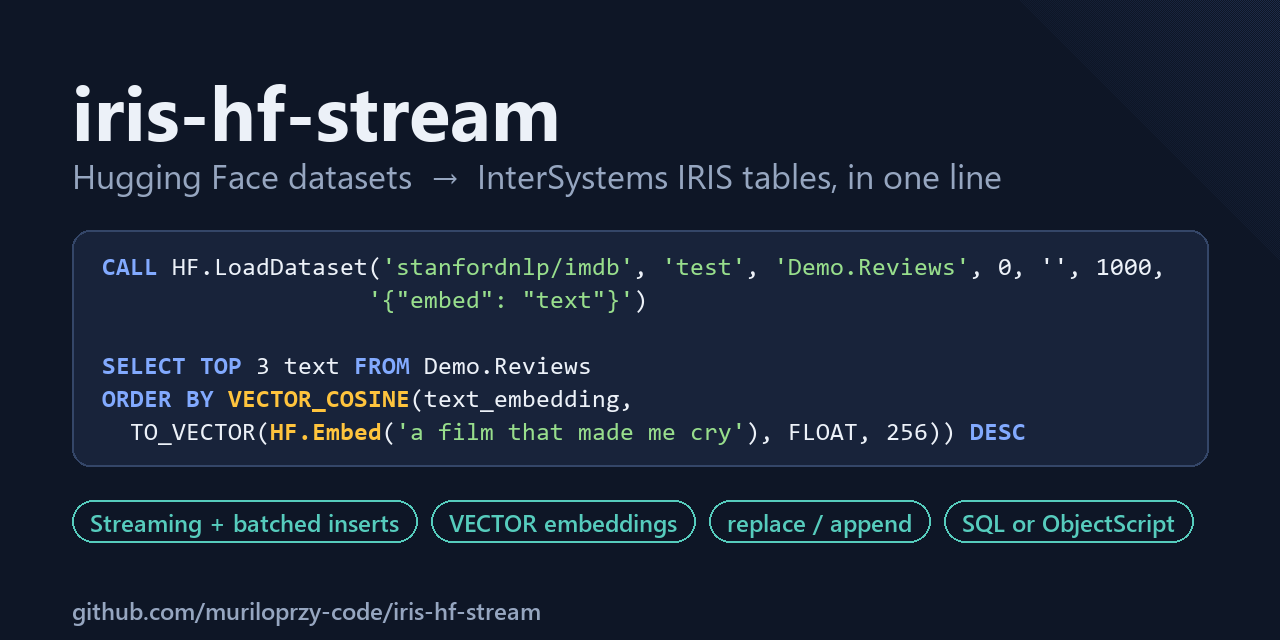

Load a Hugging Face dataset into an InterSystems IRIS table with one click in a web page served by IRIS, or with one line of SQL or ObjectScript. It streams the dataset, so it only downloads the rows you ask for, and it inserts them in batches. It can also add a VECTOR column of text embeddings, so the data is ready for semantic search in IRIS SQL.
CALL HF.LoadDataset('stanfordnlp/imdb', 'train', 'Demo.Imdb', 1000)
write ##class(HF.Loader).Load("stanfordnlp/imdb", "train", "Demo.Imdb", 1000)
-- with embeddings: the 3 reviews closest in meaning to a sentence
CALL HF.LoadDataset('stanfordnlp/imdb', 'test', 'Demo.ImdbVec', 0, '', 1000, '{"embed": "text"}')
SELECT TOP 3 label_name, SUBSTRING(text, 1, 80) FROM Demo.ImdbVec
ORDER BY VECTOR_COSINE(text_embedding, TO_VECTOR(HF.Embed('a heartwarming family film that made me cry'), FLOAT, 256)) DESC
This project implements the community idea DPI-I-543 – “Load datasets from Hugging Face into IRIS”.
Features at a glance
- One click in the web page at
/hfstream/: search the Hub, preview the columns, load with live progress, then search by meaning. - One call from ObjectScript or SQL (
CALL, Management Portal, JDBC, ODBC); always returns JSON, never throws. - Streaming download (
limitrows only), batched inserts, clean rollback on failure. - Column types inferred from a sample, widened automatically when a later row does not fit.
mode: fail, replace (atomic swap) or append;columnsto load only some;split = "all"for every split.- Readable class labels (
label_name), media columns (images, audio) left out and reported, SQL-safe column names. - Optional
VECTORembeddings plus anHF.Embed()SQL function for semantic search. SearchandInfoto find datasets and see their splits and columns before loading.- Actionable error messages for the usual Hugging Face mistakes (missing
owner/, missing config, gated dataset). - Tested: 103 Python tests (SQLite stand-in) and 12 ObjectScript tests inside IRIS (loader and web API), run by GitHub Actions on every push.
Why another loader
| Typical approach | iris-hf-stream | |
|---|---|---|
| Download | Whole dataset first, limit applied afterwards |
Streaming: load_dataset(..., streaming=True) + take(limit) |
| Insert | One row at a time | Batches of ~1000 rows, one transaction per batch |
| Text columns | Fixed VARCHAR(4000) |
VARCHAR(n) sized from a sample, LONGVARCHAR for long text, widened on the fly if needed |
| Reloading | Drop the table by hand | mode: replace (new table swapped in at the end) or append |
| Images / audio | Stored as garbage text, or the load fails | Left out before reading, listed in skipped_columns |
| AI use | Export to another tool | VECTOR embeddings in the same load, searched with VECTOR_COSINE |
| Interface | ObjectScript class | One-click web page, ObjectScript class and SQL stored procedure (usable from the Management Portal, JDBC, ODBC) |
| Dependencies | Unpinned | Pinned in requirements.txt |
Quick start
Requirements: Docker. The image is built on intersystemsdc/iris-community:latest.
git clone https://github.com/muriloprzy-code/iris-hf-stream.git
cd iris-hf-stream
docker compose up -d --build
Then open http://localhost:52773/hfstream/ and log in with an IRIS user (_SYSTEM or SuperUser, password SYS in this development image). Search for a dataset, click it, click Load into IRIS.
Or open an IRIS terminal in the USER namespace:
docker compose exec iris iris session IRIS -U USER
USER> write ##class(HF.Loader).Load("stanfordnlp/imdb", "train", "Demo.Imdb", 1000), !
{"status":"ok","table":"Demo.Imdb","rows_loaded":1000,"seconds":...,"columns":[...]}
Or use SQL, for example in the Management Portal (http://localhost:52773/csp/sys/UtilHome.csp, user SuperUser, password SYS; System Explorer → SQL, namespace USER):
CALL HF.LoadDataset('stanfordnlp/imdb', 'train', 'Demo.Imdb', 1000)
SELECT TOP 5 * FROM Demo.Imdb
Install with ZPM / IPM
zpm "install iris-hf-stream"
The Python dependencies are not installed by the module; install them once with IRIS’s own Python:
irispython -m pip install --target /mgr/python -r requirements.txt
The module also creates the /hfstream web application in the namespace it is installed in.
Outside Docker (for example IRIS on Windows), see Troubleshooting.
Port already in use? If an IRIS installed on the host already listens on 52773 (or 1972), the browser reaches that one instead of the container and
/hfstream/answers Not Found. Pick other host ports:IRIS_WEB_PORT=52780 IRIS_PORT=1980 docker compose up -d, then open http://localhost:52780/hfstream/.
Demo walkthrough
This section walks through a complete session, from an empty IRIS instance to SQL queries over real Hugging Face data. Every command was run on IRIS Community 2026.1 with datasets 5.1.0. The outputs shown are the real ones; only the seconds values change from run to run.
1. Start IRIS
git clone https://github.com/muriloprzy-code/iris-hf-stream.git
cd iris-hf-stream
docker compose up -d --build
docker compose exec iris iris session IRIS -U USER
The build installs the Python dependencies (datasets, model2vec, …) into IRIS’s embedded Python directory, downloads the default embedding model (about 30 MB) and compiles the HF package. Nothing else needs to be installed on the host.
The compose file starts IRIS with
/iris-maininstead of the image’s default entrypoint, because the default entrypoint’s post-start hook fails on the 2026.1 image and shuts IRIS down. TheUSERnamespace that hook would create already exists.
2. Or just click: the web page
Open http://localhost:52773/hfstream/ and log in with an IRIS user (_SYSTEM / SYS in this image). The page is served by IRIS itself (class HF.REST), with no other software to install.
- Find a dataset. Type a word and press Search: the Hub’s datasets, most downloaded first.
- Click one. The page reads a sample and fills in the rest: the splits with their sizes, the columns and SQL types the table will get, and a table name (
Demo.RottenTomatoes). Change anything you like: the number of rows, replace or append if the table exists, and a text column to embed. - Click Load into IRIS. The load runs in a background job, so even a long one is not cut by the web server timeout. The page shows the seconds and the rows written so far, then the first rows of the new table and the same load as one line of SQL, ready to copy.
- Search by meaning. If you chose a column to embed, type a sentence: the page shows the closest rows with their cosine score, and the SQL it ran.
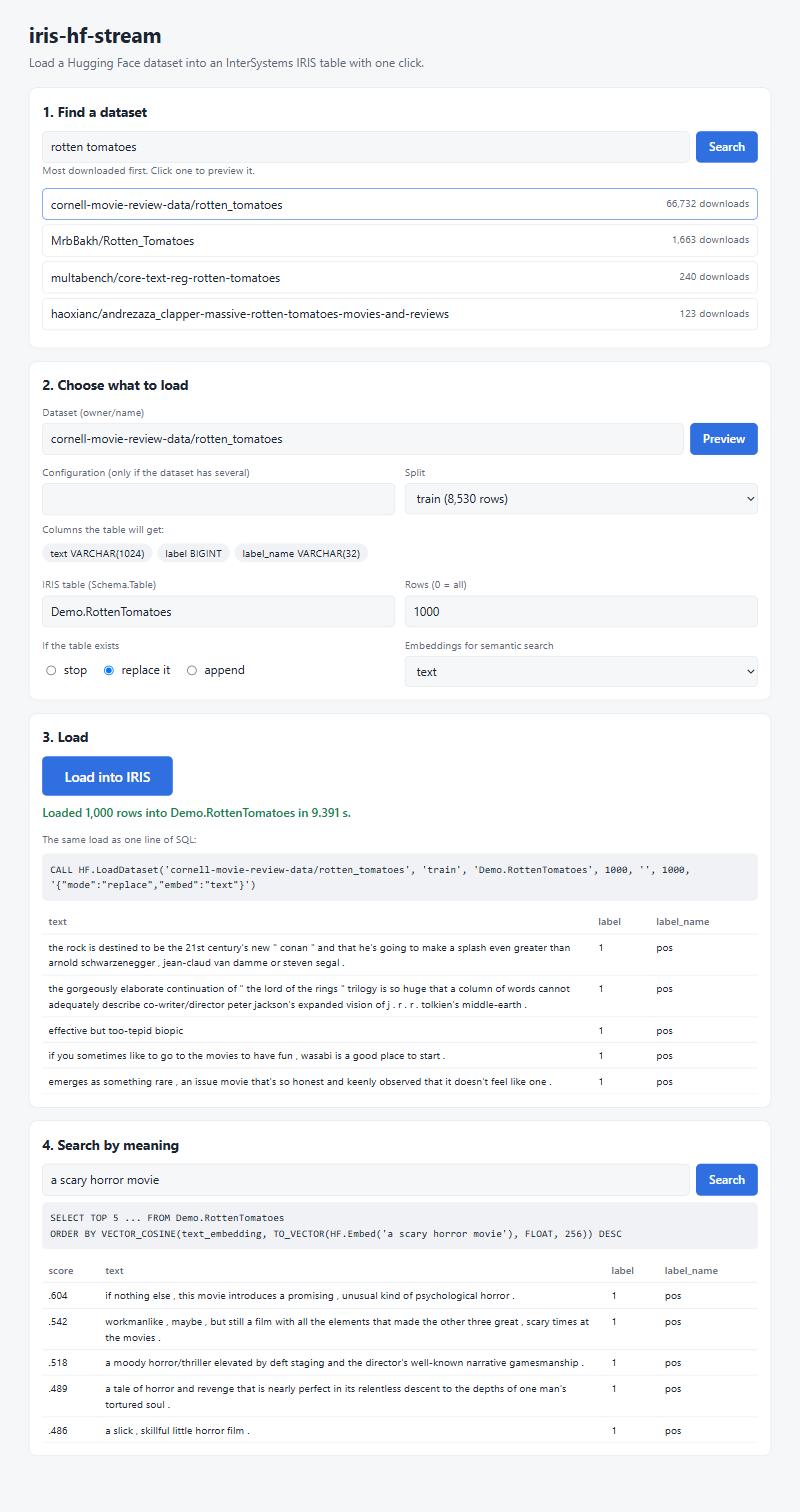
Everything the page does goes through the same HF.Loader methods as the next steps, so the result is the same as typing the commands. The rest of this walkthrough uses the terminal and SQL.
3. Find a dataset and preview it
Search asks the Hub for datasets matching a word, most downloaded first:
USER> write ##class(HF.Loader).Search("sentiment", 5), !
{"status": "ok", "term": "sentiment", "results": [
  {"id": "zeroshot/twitter-financial-news-sentiment", "downloads": 7192, "likes": 191},
  {"id": "mteb/tweet_sentiment_extraction", "downloads": 5159, "likes": 38},
  {"id": "stanfordnlp/sentiment140", "downloads": 4258, "likes": 31},
  {"id": "google-research-datasets/poem_sentiment", "downloads": 2070, "likes": 19},
  {"id": "cardiffnlp/tweet_sentiment_multilingual", "downloads": 1985, "likes": 25}]}
Then check what table a dataset would produce, without writing anything. Info streams the first 1000 rows, infers the column types, and adds the split sizes published on the Hub:
USER> write ##class(HF.Loader).Info("stanfordnlp/imdb", "train"), !
{"status": "ok", "dataset": "stanfordnlp/imdb", "split": "train", "sampled_rows": 1000,
 "columns": [{"name": "text", "source": "text", "type": "LONGVARCHAR"},
             {"name": "label", "source": "label", "type": "BIGINT"},
             {"name": "label_name", "source": "label_name", "type": "VARCHAR(32)"}],
 "splits": {"train": 25000, "test": 25000, "unsupervised": 50000},
 "download_bytes": 83446840, "dataset_bytes": 133190302}
From SQL: SELECT HF.SearchDatasets('sentiment', 5) and SELECT HF.DatasetInfo('stanfordnlp/imdb').
The movie reviews are long (up to about 6000 characters), so text becomes LONGVARCHAR instead of a fixed VARCHAR. The integer label becomes BIGINT.
label_name is not in the original data. The dataset’s metadata says label is a class label with the names neg and pos, so the loader adds a readable text column next to the number. This happens for every ClassLabel column, so you can query WHERE label_name = 'pos' instead of remembering what 1 means.
4. Load 1000 rows with one line of ObjectScript
USER> write ##class(HF.Loader).Load("stanfordnlp/imdb", "train", "Demo.Imdb", 1000), !
{"status": "ok", "table": "Demo.Imdb", "mode": "fail", "rows_loaded": 1000, "seconds": 3.061,
 "columns": [{"name": "text", "type": "LONGVARCHAR"}, {"name": "label", "type": "BIGINT"},
             {"name": "label_name", "type": "VARCHAR(32)"}]}
That one call did the following:
- opened the dataset in streaming mode and downloaded only enough data for 1000 rows (not the full 25,000-row split);
- created
Demo.Imdbwith the inferred columns; - inserted the rows with a prepared statement, one transaction per 1000-row batch.
The table is a normal IRIS SQL table:
SELECT AVG(CHARACTER_LENGTH(text)) AS avg_chars, MAX(CHARACTER_LENGTH(text)) AS max_chars FROM Demo.Imdb
-- avg_chars  max_chars
-- 1311.289   6103
SELECT TOP 3 label, label_name, SUBSTRING(text, 1, 50) AS preview FROM Demo.Imdb
-- 0  neg  I rented I AM CURIOUS-YELLOW from my video store b
-- 0  neg  "I Am Curious: Yellow" is a risible and pretentiou
-- 0  neg  If only to avoid making this type of film in the f
LONGVARCHAR columns are stored as character streams. Use SUBSTRING(column, 1, n) when you want the text itself in a result set, for example from Embedded Python, where a plain SELECT returns the stream reference.
limittakes the first rows in file order. The IMDBtrainsplit is sorted by label, so the first 1000 rows are all negative reviews (label = 0). Uselimit = 0to load the whole split, or pick a split or dataset that is already shuffled.
5. Load a whole split from SQL
The same loader is exposed as a SQL stored procedure. That means it can be called from the Management Portal (System Explorer → SQL, namespace USER, user SuperUser / password SYS), or from any JDBC or ODBC client connected to port 1972:
CALL HF.LoadDataset('stanfordnlp/imdb', 'train', 'Demo.ImdbFull', 0)
SELECT %EXACT(label_name) AS label_name, COUNT(*) AS reviews
FROM Demo.ImdbFull GROUP BY %EXACT(label_name)
-- label_name  reviews
-- neg         12500
-- pos         12500
%EXACT keeps the original case. Without it, IRIS groups VARCHAR values case-insensitively and shows them in upper case (NEG, POS).
With limit = 0, all 25,000 reviews were loaded in about 8 seconds, download included (same test machine as the Benchmark). To keep a default from SQL, pass '' (for example CALL HF.LoadDataset('stanfordnlp/imdb', '', 'Demo.T', 100) uses the train split).
6. Different kinds of data
Booleans become BIT. In BoolQ, each question has a yes/no answer:
USER> write ##class(HF.Loader).Load("google/boolq", "train", "Demo.BoolQ", 500), !
{"status": "ok", "table": "Demo.BoolQ", "mode": "fail", "rows_loaded": 500, "seconds": 2.278,
 "columns": [{"name": "question", "type": "VARCHAR(512)"}, {"name": "answer", "type": "BIT"},
             {"name": "passage", "type": "LONGVARCHAR"}]}
SELECT answer, COUNT(*) AS n FROM Demo.BoolQ GROUP BY answer
-- answer  n
-- 0       184
-- 1       316
Short text columns get a VARCHAR(n) sized from the sample (here question → VARCHAR(512)). Long ones get LONGVARCHAR (passage).
Nested values become JSON. In SQuAD, the answers column is a dictionary of lists. It is stored as JSON text, which IRIS SQL can unpack with JSON_TABLE:
USER> write ##class(HF.Loader).Load("rajpurkar/squad", "train", "Demo.Squad", 500), !
{"status": "ok", "table": "Demo.Squad", "mode": "fail", "rows_loaded": 500, "seconds": 3.105,
 "columns": [{"name": "id", "type": "VARCHAR(128)"}, {"name": "title", "type": "VARCHAR(128)"},
             {"name": "context", "type": "LONGVARCHAR"}, {"name": "question", "type": "VARCHAR(1024)"},
             {"name": "answers", "type": "LONGVARCHAR"}]}
SELECT TOP 2 question, SUBSTRING(answers, 1, 80) AS answers FROM Demo.Squad
-- To whom did the Virgin Mary allegedly appear in 1858 in Lourdes France?  {"text": ["Saint Bernadette Soubirous"], "answer_start": [515]}
-- What is in front of the Notre Dame Main Building?                        {"text": ["a copper statue of Christ"], "answer_start": [188]}
SELECT TOP 3 s.question, j.answer
FROM Demo.Squad s,
JSON_TABLE(SUBSTRING(s.answers, 1, 4000), '$.text[*]' COLUMNS (answer VARCHAR(200) PATH '$')) j
-- To whom did the Virgin Mary allegedly appear in 1858 in Lourdes France?       Saint Bernadette Soubirous
-- What is in front of the Notre Dame Main Building?                             a copper statue of Christ
-- The Basilica of the Sacred heart at Notre Dame is beside to which structure?  the Main Building
Images and audio are left out, and reported. A SQL column cannot hold a picture in a useful way, so media columns (Image, Audio, Video, Pdf) and raw binary columns are dropped before any row is read. The images are never decoded, so Pillow is not needed. The JSON result lists what was left out. In MNIST, that keeps the digit label:
USER> write ##class(HF.Loader).Load("ylecun/mnist", "train", "Demo.Mnist", 100), !
{"status": "ok", "table": "Demo.Mnist", "mode": "fail", "rows_loaded": 100, "seconds": 4.782,
 "columns": [{"name": "label", "type": "BIGINT"}, {"name": "label_name", "type": "VARCHAR(32)"}],
 "skipped_columns": ["image"]}
SELECT label_name, COUNT(*) AS n FROM Demo.Mnist GROUP BY label_name ORDER BY label_name
-- label_name  n
-- 0           13
-- 1           14
-- 2           6
-- ...
Column names are made SQL-safe. lhoestq/demo1 has a column called date, which is a reserved word in IRIS SQL. The loader renames it to date_, so you can query it without quoting. Accents are removed (preço → preco), spaces and other symbols become _, and duplicate names get a numeric suffix.
USER> write ##class(HF.Loader).Load("lhoestq/demo1", "train", "Demo.Reviews", 0), !
{"status": "ok", "table": "Demo.Reviews", "mode": "fail", "rows_loaded": 5, "seconds": 1.643,
 "columns": [{"name": "id", "type": "VARCHAR(256)"}, {"name": "package_name", "type": "VARCHAR(128)"},
             {"name": "review", "type": "LONGVARCHAR"}, {"name": "date_", "type": "VARCHAR(64)"},
             {"name": "star", "type": "BIGINT"}, {"name": "version_id", "type": "BIGINT"}]}
SELECT TOP 3 star, date_, package_name FROM Demo.Reviews
-- 4  October 12 2016  com.mantz_it.rfanalyzer
-- 4  August 23 2016   com.mantz_it.rfanalyzer
-- 5  August 04 2016   com.mantz_it.rfanalyzer
Datasets with several configurations. Pass the configuration name as the fifth argument. GLUE, for example, has one configuration per task:
USER> write ##class(HF.Loader).Load("nyu-mll/glue", "validation", "Demo.Sst2", 200, "sst2"), !
{"status": "ok", "table": "Demo.Sst2", "mode": "fail", "rows_loaded": 200, "seconds": 2.159,
 "columns": [{"name": "sentence", "type": "VARCHAR(1024)"}, {"name": "label", "type": "BIGINT"},
             {"name": "idx", "type": "BIGINT"}, {"name": "label_name", "type": "VARCHAR(32)"}]}
SELECT TOP 2 label, label_name, sentence FROM Demo.Sst2
-- 1  positive  it 's a charming and often affecting journey .
-- 0  negative  unflinchingly bleak and desperate
If you forget the configuration, the error message lists the available ones (see the next step).
Missing values (None in Python) are stored as SQL NULL in every column type, and empty strings stay empty strings.
7. Semantic search with a VECTOR column
Add {"embed": "text"} to the options and every row also gets an embedding of its text, stored in a VECTOR(FLOAT, 256) column. The embeddings come from model2vec (minishlab/potion-base-8M by default). It is a static embedding model that needs no GPU and no PyTorch, and it encodes thousands of texts per second, so it keeps up with a streaming load.
USER> write ##class(HF.Loader).Load("stanfordnlp/imdb", "test", "Demo.ImdbVec", 0, , , {"embed": "text"}), !
{"status": "ok", "table": "Demo.ImdbVec", "mode": "fail", "rows_loaded": 25000, "seconds": 23.929,
 "columns": [{"name": "text", "type": "LONGVARCHAR"}, {"name": "label", "type": "BIGINT"},
             {"name": "label_name", "type": "VARCHAR(32)"}, {"name": "text_embedding", "type": "VECTOR(FLOAT, 256)"}]}
All 25,000 reviews were downloaded, embedded and stored in 24 seconds. HF.Embed(text) embeds a query with the same model, so you can search by meaning straight from SQL:
SELECT TOP 3 label_name, SUBSTRING(text, 1, 80) AS review FROM Demo.ImdbVec
ORDER BY VECTOR_COSINE(text_embedding, TO_VECTOR(HF.Embed('a heartwarming family film that made me cry'), FLOAT, 256)) DESC
-- pos  Who will love my children has changed my heart, it made me cry all the way throu
-- pos  I am a 20 year old bloke from England. I don't cry at films. But this one moved
-- pos  I read the book before watching the movie and it left me emotionally drained but
SELECT TOP 3 label_name, SUBSTRING(text, 1, 80) AS review FROM Demo.ImdbVec
ORDER BY VECTOR_COSINE(text_embedding, TO_VECTOR(HF.Embed('a scary horror movie with lots of blood'), FLOAT, 256)) DESC
-- pos  I'm warning you -- this movie is not scary. If you're a horror movie fan, especi
-- pos  This movie is so awesome! I loved it, it was really scary. I love the Scream mov
-- pos  After the return of "horror movies" (come on Scream isn't scary!) i didn't have
The vectors also carry sentiment. Among the 200 reviews closest to a negative sentence, all 200 are negative; for a positive sentence, 199 of 200 are positive:
SELECT %EXACT(label_name) AS label_name, COUNT(*) AS n FROM (
  SELECT TOP 200 label_name FROM Demo.ImdbVec
  ORDER BY VECTOR_COSINE(text_embedding, TO_VECTOR(HF.Embed('the worst film I have ever seen, boring and awful'), FLOAT, 256)) DESC)
GROUP BY %EXACT(label_name)
-- neg  200
-- ... same query with 'a brilliant masterpiece, beautifully acted, I loved it'
-- neg  1
-- pos  199
Any other model2vec model can be used with {"embed": "text", "embed_model": "<id>"}; pass the same id to HF.Embed(text, '<id>') and use its dimension in TO_VECTOR.
8. Reload, append, every split, some columns
By default a load refuses an existing table. The mode option changes that:
USER> write ##class(HF.Loader).Load("cornell-movie-review-data/rotten_tomatoes", "train", "Demo.Rotten", 100), ! {"status": "ok", "table": "Demo.Rotten", "mode": "fail", "rows_loaded": 100, ...}USER> write ##class(HF.Loader).Load("cornell-movie-review-data/rotten_tomatoes", "train", "Demo.Rotten", 100), ! {"status": "error", "code": "VALIDATION", "message": "table Demo.Rotten already exists; drop it first (DROP TABLE Demo.Rotten) or pass {"mode": "replace"} or {"mode": "append"} in the options"}
USER> write ##class(HF.Loader).Load("cornell-movie-review-data/rotten_tomatoes", "train", "Demo.Rotten", 200, , , {"mode": "replace"}), ! {"status": "ok", "table": "Demo.Rotten", "mode": "replace", "rows_loaded": 200, ...}
USER> write ##class(HF.Loader).Load("cornell-movie-review-data/rotten_tomatoes", "test", "Demo.Rotten", 50, , , {"mode": "append"}), ! {"status": "ok", "table": "Demo.Rotten", "mode": "append", "rows_loaded": 50, ...}
SELECT COUNT(*) FROM Demo.Rotten
-- 250
replace loads into a new table and swaps it in only at the end, so if the load fails the old table is still there, unchanged. append adds rows to the existing table; the dataset’s columns must exist in it (use columns to pick them).
split = "all" loads every split into one table, with an hf_split column. limit then applies to each split:
USER> write ##class(HF.Loader).Load("cornell-movie-review-data/rotten_tomatoes", "all", "Demo.RottenAll", 0), !
{"status": "ok", "table": "Demo.RottenAll", "mode": "fail", "rows_loaded": 10662, "seconds": 8.529,
 "columns": [{"name": "text", "type": "LONGVARCHAR"}, {"name": "label", "type": "BIGINT"},
             {"name": "label_name", "type": "VARCHAR(32)"}, {"name": "hf_split", "type": "VARCHAR(32)"}],
 "rows_per_split": {"train": 8530, "validation": 1066, "test": 1066}}
columns loads only the columns you name. On the Hub’s parquet files only those columns are read:
USER> write ##class(HF.Loader).Load("rajpurkar/squad", "train", "Demo.SquadQ", 2000, , , {"columns": ["title", "question"]}), !
{"status": "ok", "table": "Demo.SquadQ", "mode": "fail", "rows_loaded": 2000, "seconds": 3.289,
 "columns": [{"name": "title", "type": "VARCHAR(128)"}, {"name": "question", "type": "VARCHAR(1024)"}]}
If a later row does not fit the type chosen from the sample, the column is widened with ALTER TABLE and the load goes on. The result says what changed, for example "widened_columns": [{"name": "text", "from": "VARCHAR(32)", "to": "VARCHAR(1048576)"}, {"name": "n", "from": "BIGINT", "to": "DOUBLE"}].
9. Errors come back as JSON, never as exceptions
Load never throws, so it is safe to call from SQL, from a production or from a scheduled task. Every problem is reported with a code and a message that says what to do next. The usual mistakes with Hugging Face datasets are recognized and explained:
USER> write ##class(HF.Loader).Load("imdb", "train", "Demo.Short", 10), ! {"status": "error", "code": "DOWNLOAD", "message": "dataset 'imdb' needs its full id in the form owner/name (for example 'stanfordnlp/imdb'); look it up at https://huggingface.co/datasets?search=imdb"}USER> write ##class(HF.Loader).Load("nyu-mll/glue", "validation", "Demo.Glue", 10), ! {"status": "error", "code": "DOWNLOAD", "message": "dataset 'nyu-mll/glue' has several configurations; pass one as the config argument. Available: ax, cola, mnli, mnli_matched, mnli_mismatched, mrpc, qnli, qqp, rte, sst2, stsb, wnli."}
USER> write ##class(HF.Loader).Load("bigcode/the-stack", "train", "Demo.Gated", 10), ! {"status": "error", "code": "DOWNLOAD", "message": "dataset 'bigcode/the-stack' is gated: accept its terms at https://huggingface.co/datasets/bigcode/the-stack and set the HF_TOKEN environment variable for the IRIS process"}
USER> write ##class(HF.Loader).Load("stanfordnlp/imdb", "no_such_split", "Demo.Nope", 10), ! {"status": "error", "code": "DOWNLOAD", "message": "split not found in dataset 'stanfordnlp/imdb'. Available splits: train, test, unsupervised."}
USER> write ##class(HF.Loader).Load("no-such-user/no-such-dataset", "train", "Demo.Nope", 10), ! {"status": "error", "code": "DOWNLOAD", "message": "dataset 'no-such-user/no-such-dataset' was not found on the Hugging Face Hub; check the id (owner/name). If it is private, set the HF_TOKEN environment variable"}
USER> write ##class(HF.Loader).Load("stanfordnlp/imdb", "train", "Demo.Imdb", 10), ! {"status": "error", "code": "VALIDATION", "message": "table Demo.Imdb already exists; drop it first (DROP TABLE Demo.Imdb) or pass {"mode": "replace"} or {"mode": "append"} in the options"}
USER> write ##class(HF.Loader).Load("stanfordnlp/imdb", "train", "NoSchema", 10), ! {"status": "error", "code": "VALIDATION", "message": "invalid target 'NoSchema'; expected schema.table with letters, digits and underscores, starting with a letter"}
Existing tables are never overwritten. If a load fails halfway (for example a later row that does not fit the inferred type), the current batch is rolled back and the table created by that call is dropped, so nothing half-filled is left behind.
10. Measure batching
USER> do ##class(HF.Benchmark).Run("stanfordnlp/imdb", "train", 5000, 1000)
Warm-up (not timed)...
Bench.RowByRow  batchSize=1  status=ok  elapsed=3.91s
Bench.Batched  batchSize=1000  status=ok  elapsed=2.99s
See Benchmark for the numbers across 57 runs and how to read them.
11. Clean up
DROP TABLE Demo.Imdb
DROP TABLE Demo.ImdbFull
DROP TABLE Demo.BoolQ
DROP TABLE Demo.Squad
DROP TABLE Demo.Reviews
DROP TABLE Demo.Sst2
DROP TABLE Demo.Mnist
DROP TABLE Demo.ImdbVec
DROP TABLE Demo.Rotten
DROP TABLE Demo.RottenAll
DROP TABLE Demo.SquadQ
DROP TABLE Demo.RottenTomatoes   -- if you loaded it from the web page
To start over completely, run docker compose down. The container keeps no volumes, so everything is removed.
Usage
HF.Loader.Load(dataset, split, target, limit, config, batchSize, options) and the SQL procedure HF.LoadDataset(...) take the same arguments:
| Parameter | Meaning |
|---|---|
dataset |
Dataset id on Hugging Face, e.g. stanfordnlp/imdb (required) |
split |
Split name; train when empty; all loads every split and adds an hf_split column |
target |
Destination table as schema.table |
limit |
Maximum number of rows to load (per split with all); 0 loads everything |
config |
(optional) Dataset configuration name, for datasets that have several (e.g. sst2) |
batchSize |
(optional) Rows per transaction, default 1000 |
options |
(optional) JSON object, see below. From ObjectScript a dynamic object works too: {"mode": "append"} |
| Option | Meaning |
|---|---|
mode |
fail (default): the table must not exist. replace: build a new table and swap it in at the end. append: add rows to the existing table |
columns |
List of dataset columns to load, e.g. ["title", "question"] |
embed |
Column (or list of columns) whose text gets a <column>_embedding VECTOR(FLOAT, n) column |
embed_model |
model2vec model id, default minishlab/potion-base-8M (256 dimensions) |
sample_size |
Rows sampled to infer the column types, default 1000 |
From SQL, pass '' for an argument you want to leave at its default:
CALL HF.LoadDataset('rajpurkar/squad', '', 'Demo.Q', 500, '', 1000, '{"columns": ["question"], "embed": "question"}')
The call never throws. It returns a JSON string:
{"status": "ok", "table": "Demo.Imdb", "mode": "fail", "rows_loaded": 1000, "seconds": 3.06,
 "columns": [{"name": "text", "type": "LONGVARCHAR"}, {"name": "label", "type": "BIGINT"},
             {"name": "label_name", "type": "VARCHAR(32)"}]}
Depending on the load, the result can also have "rows_per_split" (with split = "all"), "skipped_columns" (media or binary columns left out) and "widened_columns" (columns altered because a later row did not fit).
Validation, download and database problems come back as JSON too:
{"status": "error", "code": "VALIDATION", "message": "table Demo.Imdb already exists; drop it first (DROP TABLE Demo.Imdb) or pass {\"mode\": \"replace\"} or {\"mode\": \"append\"} in the options"}
code |
Meaning |
|---|---|
VALIDATION |
Bad dataset id, split, target, option or numeric argument; target table already exists (mode fail); reserved word as a table name |
DOWNLOAD |
Dataset or split not found, missing owner/ in the id, missing configuration, gated or private dataset without a token, network failure |
EMPTY |
The split returned no rows, or it only has columns that cannot be stored (e.g. only images) |
DATABASE |
IRIS rejected a statement |
SCHEMA / VALUE_TOO_LONG |
A later row does not fit and the column cannot be widened (e.g. text in an integer column) |
INTERNAL |
Anything unexpected |
Other methods
| ObjectScript | SQL | What it does |
|---|---|---|
HF.Loader.Info(dataset, split, config, sampleSize, options) |
HF.DatasetInfo(...) |
Columns and types Load would create, plus split sizes from the Hub. Writes nothing |
HF.Loader.Search(term, limit) |
HF.SearchDatasets(...) |
Datasets on the Hub matching term, most downloaded first |
HF.Loader.Embed(text, model) |
HF.Embed(...) |
The embedding of text as '[x,y,...]', for TO_VECTOR in a query. Raises an error on failure, so a search never silently matches nothing |
Web page and REST API
The /hfstream web application (class HF.REST) serves the page and a small JSON API. Every route needs an IRIS user (HTTP Basic authentication; an anonymous request gets 401 and the browser asks for a login). Cross-origin requests are not answered, and a load can only be started with a JSON body.
| Route | What it does |
|---|---|
GET /hfstream/ |
The page |
GET /hfstream/api/search?term=&limit= |
HF.Loader.Search |
GET /hfstream/api/info?dataset=&split=&config= |
HF.Loader.Info (sample of 200 rows) |
POST /hfstream/api/load |
Starts HF.Loader.Load in a background job. Body: {"dataset", "split", "target", "limit", "config", "options"}. Returns {"job": id} |
GET /hfstream/api/load/{id} |
{"state": "running", "seconds", "rows_so_far"}, then {"state": "done", "result": {...}} with the loader’s JSON result |
GET /hfstream/api/rows?table=&n= |
First rows of a table (long text cut to 300 characters, VECTOR columns left out) |
GET /hfstream/api/similar?table=&column=&q=&n= |
The rows closest in meaning to q, using a VECTOR column, with the score and the SQL |
curl -u _SYSTEM:SYS -H "Content-Type: application/json" \
  -d '{"dataset": "cornell-movie-review-data/rotten_tomatoes", "split": "train", "target": "Demo.Rotten", "limit": 100}' \
  http://localhost:52773/hfstream/api/load
To create the web application in another namespace: do ##class(HF.REST).CreateWebApp("MYNS").
Private or gated datasets
Set the HF_TOKEN environment variable for the IRIS process. With Docker Compose: HF_TOKEN=hf_xxx docker compose up -d. For a gated dataset, also accept its terms on its Hugging Face page.
How it works
- Stream. The dataset is opened with
streaming=Trueandtake(limit), so only the shards needed for those rows are read. Withcolumns, only those columns are read. Withsplit = "all", one stream per split. - Read the metadata. The dataset’s
featuressay what each column is. Media columns (Image,Audio,Video,Pdf) and raw binary columns are dropped before any row is read (and never decoded). EachClassLabelcolumn gets a companion<column>_nametext column with the class name. - Infer types. The first 1000 rows (
sample_size) are sampled. Integers becomeBIGINT, floatsDOUBLE, booleansBIT, datesDATE, timestampsTIMESTAMP. For strings, the longest sampled value (with 4× headroom) picksVARCHAR(n), orLONGVARCHARwhen the text is long. Lists and dictionaries are stored as JSON text. Column names are made SQL-safe (accents, spaces, reserved words, duplicates). - Embed (optional). For each batch, the texts of the
embedcolumns are encoded together and stored withTO_VECTOR. - Insert in batches. Rows are inserted with a prepared statement; each batch of
batchSizerows runs in its own transaction. If a row does not fit its column, the column is widened first (ALTER TABLE ... ALTER COLUMN): a longerVARCHAR, up to the IRIS maximum of 3,641,144 characters, orDOUBLEfor a float in an integer column. - Clean failure. If a batch fails, it is rolled back. A table created by this call is dropped; with
replace, the old table is left untouched; withappend, the error says how many rows were already added.
| Value from the dataset | IRIS column |
|---|---|
int |
BIGINT (widened to DOUBLE if a float shows up later) |
float |
DOUBLE (NaN and ±Infinity are stored as NULL) |
bool |
BIT |
datetime |
TIMESTAMP (timezone-aware values are converted to UTC) |
date |
DATE |
str |
VARCHAR(32…1024) or LONGVARCHAR (a VARCHAR is widened if a longer value shows up later) |
list, dict |
LONGVARCHAR containing JSON |
mixed types, all-NULL columns |
LONGVARCHAR |
ClassLabel (e.g. label) |
BIGINT, plus a label_name text column |
Image, Audio, Video, Pdf, raw bytes |
left out, listed in skipped_columns |
embed option |
<column>_embedding VECTOR(FLOAT, 256) |
None is stored as SQL NULL and the empty string stays an empty string, in every column type.
Benchmark
HF.Benchmark compares one commit per row (batchSize = 1) with batched commits. It runs a warm-up load first so the download does not skew the numbers.
do ##class(HF.Benchmark).Run("stanfordnlp/imdb", "train", 5000, 1000)
| batchSize | rows | seconds (median) | min – max |
|---|---|---|---|
| 1 (row by row) | 5000 | 3.91 | 3.75 – 5.25 |
| 1000 | 5000 | 2.99 | 2.85 – 5.28 |
Measured on 2026-11-04: stanfordnlp/imdb, train split, 57 runs, IRIS Community 2026.1 in Docker Desktop (Windows 11, 8 CPUs, 8 GB for Docker), datasets 5.1.0. Batched commits were about 1.3× faster.
Both timings include streaming the rows from the Hugging Face Hub. Streaming does not cache data, so every load downloads its rows again, and the network accounts for most of the elapsed time. The gap between the two rows (about 0.9 s) is roughly the cost of 5000 separate commits.
Why not LOAD DATA?
IRIS can bulk-load a CSV file with LOAD DATA, so it was measured against the prepared inserts used here: 25,000 rows of 1.4 KB text each, no network involved, same machine.
| Method | 25,000 rows |
|---|---|
Prepared INSERT, 1000 rows per transaction, LONGVARCHAR column |
2.5 s (about 10,000 rows/s) |
Same, VARCHAR(4096) column |
1.35 s (about 18,500 rows/s) |
LOAD DATA from a CSV file |
4.0 s, plus 1.0 s to write the CSV |
LOAD DATA starts a Java process, which costs more than it saves at this size, and it would need a temporary file. The inserts are not the bottleneck: loading the whole IMDB split (25,000 rows) takes about 8 seconds, most of it download.
Limitations
- Column types come from the first rows. A later value that cannot be widened (text in an integer column, a string longer than 3,641,144 characters) stops the load with a
SCHEMAorVALUE_TOO_LONGerror. A largersample_sizehelps. - With
append, the existing table’s column sizes are kept (the table is not altered); a value that does not fit is aDATABASEerror, and the batches already committed stay in the table. - Images, audio, video and other binary columns are not stored. They are left out and listed in
skipped_columns, and the other columns of the dataset still load. limittakes the first rows in file order, which are not a random sample (several datasets are sorted by label).- Embeddings use model2vec static models: fast and small, but less precise than large transformer models.
- Datasets that depend on custom loading scripts are not supported by recent versions of the
datasetslibrary.
Troubleshooting outside Docker
The Docker image sets everything up. On an IRIS installed directly (for example on Windows, installed with ZPM), check these:
-
Install the Python packages with IRIS’s own Python, into
<install-dir>/mgr/python:/bin/irispython -m pip install --target /mgr/python -r requirements.txt -
Windows: files installed by an administrator are not readable by IRIS. If
import datasetsfails with a permission error after installing from an administrator prompt, reset the permissions of the folder:icacls "\mgr\python" /reset /T /C /Q -
The Hugging Face cache. Downloads (dataset metadata, embedding models) are cached in
~/.cache/huggingface. When IRIS runs as a Windows service, that folder may not be writable;hfstreamthen falls back to a folder in the system temp directory. To choose the folder yourself, setHF_HOMEfor the IRIS process. -
Dataset ids need the owner:
stanfordnlp/imdb, notimdb.HF.Loader.Search("imdb")finds the full id.
These Windows notes come from testing an earlier prototype on IRIS 2026.2 for Windows; this version was tested in Docker only.
Development
The Python logic is tested without IRIS, using SQLite in place of the IRIS backend:
pip install -r requirements.txt pytest
pytest
With datasets installed, tests/test_streaming_local.py also runs the real library against local files (no network needed): streaming and take(), split = "all", column selection, class-label names, and an Image column that must be dropped without being decoded.
The public API and the web API are tested inside IRIS by %UnitTest classes in tests-iris/ (they read small datasets from the Hub, and call the web API through the IRIS web server):
docker compose exec iris iris session IRIS -U USER "##class(HFTest.Runner).Run()"
GitHub Actions runs both on every push (.github/workflows/tests.yml): pytest, then a Docker build of IRIS and the ObjectScript tests.
iris-hf-stream/
├── src/HF/Loader.cls        # public API: Load, Info, Search, Embed (+ SQL procedures)
├── src/HF/REST.cls          # one-click web page and REST API at /hfstream/
├── src/HF/Benchmark.cls     # row-by-row vs batched comparison
├── python/hfstream/         # streaming, type inference, batched inserts, embeddings
├── tests/                   # pytest (SQLite stand-in for IRIS)
├── tests-iris/HFTest/       # %UnitTest classes, run inside IRIS
├── .github/workflows/       # CI
├── Dockerfile, docker-compose.yml, iris.script, module.xml
└── requirements.txt         # pinned
License
MIT
Made with
Install
 zpm install iris-hf-stream
 download archive
Version
1.0.005 Nov, 2026
Category
Technology ExampleWorks with
InterSystems IRISFirst published
05 Nov, 2026Last edited
05 Nov, 2026