


© 2026 InterSystems Corporation. All rights reserved.Privacy & TermsGuaranteeSection 508Contest TermsCode of ConductModeration PolicyCookies Settings

Storm Link 

Community Project
This project is maintained by its author and is not officially supported by InterSystems. For technical support, please contact the project developer.
0
0 reviews
0
Awards
126
Views
2
IPM installs
 0
 Add to bundle

Details
Releases (6)
Reviews
Issues
Videos (1)
Articles (1)
Folds an IRIS alert storm into one root cause on a Managed Alert
What's new in this version
1.0.5 — Optional Java PEX handoff
- New: an optional Java Business Operation built with InterSystems PEX. Storm.JavaHandoff (EnsLib.PEX.BusinessOperation) runs storm.pex.SafeHandoffOperation through the %Java Server gateway and turns each newly saved root cause into a short on-call handoff card, shown in the storm's own Visual Trace session.
- Off by default. A standard install behaves exactly as 1.0.4; the README section "Java PEX (optional)" shows how to switch it on, what to look for, the recovery step and how to switch it off again: https://github.com/inunanba/storm-link#java-pex-optional
- The FINAL result is returned before Java is called. In fresh isolated IPM installs on IRIS 2026.3 AI Hub build 154 with Java 11, storms A1 and A2 gave the same results and Managed Alerts with Java PEX off and on, and the native suites passed (12/72, Workflow 9/64): https://github.com/inunanba/storm-link/blob/main/docs/java-pex-1.0.5-ipm-run.txt
- Java source and build script are in pex/; the shipped jar rebuilds to the same class files.
Storm Link
For judges: 2 minutes
Find the one root cause behind an IRIS alert storm, with the evidence on the root Managed Alert.
Try it live: https://nemesis-evoke-guidance.ngrok-free.dev/ — a running, read-only IRIS demo that replays recorded AI answers. Click Visit Site on the ngrok notice, then sign in as viewer / StormLink-Viewer-2026.

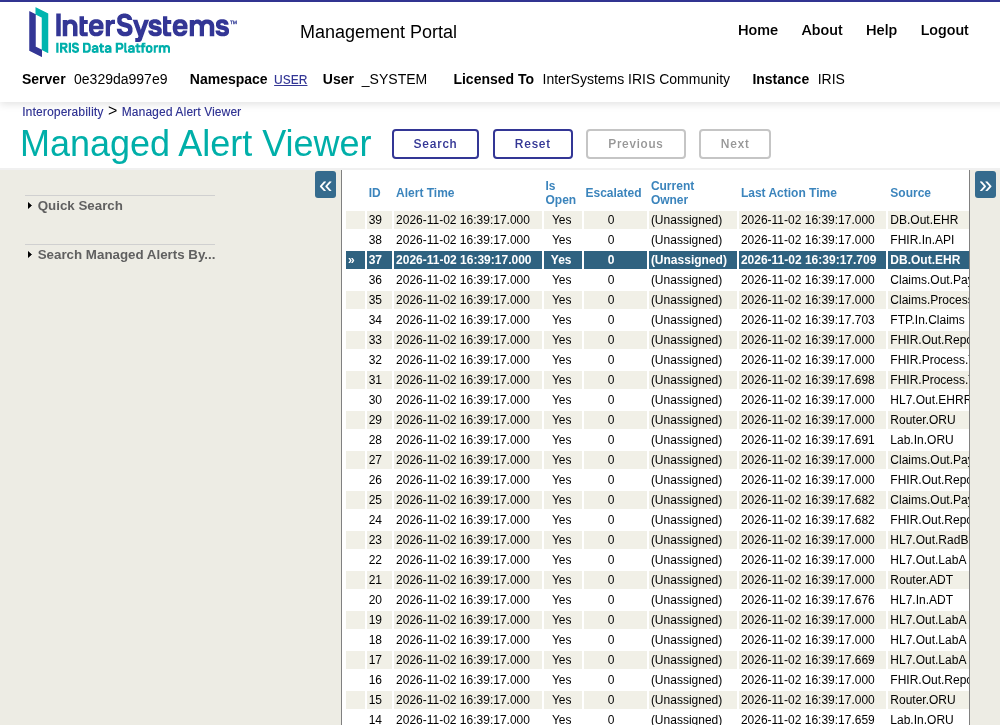
In the online demo, open Managed Alerts → alert 4 → Action 4 → Reason. Storm Link identified DB.Out.EHR as storm A1’s root cause; the recorded explanation cites error #6022 from SQLServer.EHR. The same storm as one session: Visual Trace, session 6 (screenshot). Full-window view of the alert: screenshot.
When one interface fails, every component downstream raises its own alert. Storm Link uses a versioned Production topology graph, folds the storm into one root cause on a native Managed Alert, and lets an IRIS AI Hub agent answer the yes/no questions the graph cannot settle.
Evidence at a glance: the live-mode trace of storm A1 (Llama 3.2 3B answered both yes/no questions) and the root Managed Alert with the AI evidence written as an action reason. Submitting the same storm ID again returns the saved receipt.
Different causes stay separate, too: in an isolated Storm Link 1.0.4 run, the IRIS AI Hub agent used a recorded answer for storm A2, Storm Link grouped the TCP listener and TLS certificate alerts under separate causes, and resending the same storm ID added no alerts (A2 replay evidence).
New in 1.0.5: optional Java PEX handoff. A Java Business Operation built with InterSystems PEX can turn each saved root cause into a short on-call handoff card, in the same Visual Trace session. It is off by default; Java PEX (optional) shows how to switch it on and what to look for. The online demo above runs 1.0.4 without Java PEX.
1. Watch the demo video: https://youtu.be/br2Apjz17WI (1:42). Earlier official cut: https://youtu.be/N950ADnIfTc (MP4 download, no sign-in: storm-link-demo.mp4)
2. See the results.
| Storms solved exactly | Graph rule | Graph + AI |
|---|---|---|
| Development set (14) | 10/14 | 14/14 |
| Second set (15) | 6/15 | 11/15 |
| Ambiguous storms, both sets (18) | 5/18 | 14/18 |
Adding the AI step raised the ambiguous storms solved from 5 to 14 out of 18, and graph + AI solved all 14 storms in the development set. On the second set of 15 new cases, graph + AI reached 11/15.
3. Run it locally in two commands (after loading the InterSystems IRIS 2026.3 AI Hub Community image, build 154, once — see Quick start):
docker compose up -d --build     # IRIS + worker, healthy in about 15 s once the image is loaded
./scripts/demo.sh                # replay two storms + run all native tests
The script folds two storms into their root causes and runs the native IRIS %UnitTest suite: 12 test methods and 72 assertions, all passing. Replay mode needs no API key and no model download.
4. Open the result where on-call already looks.
- Managed Alerts → alert 4: the root cause
DB.Out.EHRfor storm A1, with the AI evidence written as an action reason. - Visual Trace (link printed by the script): the whole storm as one session, Service → Process → WorkerOp → Process, and the Agent step with the model, tool calls and duration.
In live mode, the Llama 3.2 3B model answered both yes/no questions for storm A1 and all three alerts landed under DB.Out.EHR (live trace export). Full walkthrough: Root cause in two minutes.
What it does
- Groups by topology. A versioned graph of the Production joins alerts from different components that share an upstream path, and picks the upstream root.
- AI Hub decisions, with a traceable path to action. A detector spots root conflicts and possible coincidences, and an IRIS AI Hub agent (
%AI.Agent) answers one yes/no question per conflict. Storm Link assembles the result against its candidate and grouping rules; IRIS traces the agent steps in Visual Trace and records the result on Managed Alerts. - Writes to the place on-call already looks. All original alerts become
Ens.Alerting.ManagedAlertrecords; the root alert carries the AI evidence as an action reason, and the receipt is written in the same transaction. - Traceable end to end. Each storm is one Visual Trace session: Service → Process → WorkerOp → Process, and Agent when the graph asks a question. The agent step shows the model, tool calls and duration.
- Idempotent. Resubmitting a storm ID returns the saved receipt with zero new alerts and zero new agent calls.
- AI proposals reach a teammate through IRIS Workflow. IRIS Workflow brings AI proposals selected by Storm Link’s grouping-rule checks to a teammate’s inbox. The teammate can inspect the evidence and record Checked or NeedsEngineer, while the saved root cause and grouping stay unchanged. In a stop/restart-then-resend test, there was 1 Workflow task (restart evidence, fresh IPM install run). Try Workflow after an IPM install with the administrator steps in Quick start; the browser demo shows A1’s Managed Alert and Visual Trace.
Community Idea implemented
DPI-I-689: Use InterSystems Interoperability as a Traceability tool for GenAI LLM pipelines (status: Community Opportunity).
Storm Link uses Visual Trace as the trace for every LLM call in the storm production:
- What we needed. When the production asks the model a yes/no question, that call should appear in the same Visual Trace session as the storm, with the model name, token counts and how long it took — without a separate tracing service.
- What we built. Each storm is one Interoperability session:
Storm.Service→Storm.Process→Storm.WorkerOp→Storm.Process, andStorm.Agentonly when the graph asks a question. Every agent call is a stored message; the reply carries the model, token usage and duration. - What you can see. On storm A1 in live mode, Visual Trace shows both agent calls to
llama3.2-3b-ctx16k(409 and 386 tokens, 10.9 s and 3.4 s). The same numbers are in the live trace export and the screenshot below.

The same flow also answers DPI-I-627 (AI assisted debug, Community Opportunity): when the topology graph cannot pick a single root, %AI.Agent assesses the conflicting alerts, answers the yes/no questions that settle the storm, and writes those reasons onto the Managed Alert that on-call already opens.
Quick start
Prerequisites: Docker with Compose, and the InterSystems IRIS 2026.3 AI Hub Community image (build 154) loaded locally. No licence key, API key or model download is needed.
docker image load -i iris-community-2026.3.0AI.154.0-docker.tar.gz   # one-time
docker tag docker.iscinternal.com/docker-intersystems/intersystems/iris-community:2026.3.0AI.154.0 iris-ai-hub:local154   # one-time
docker compose up -d --build
docker compose ps        # iris and worker show (healthy)
IPM: the package is storm-link (module.xml at the repo root). On an IRIS 2026.3 AI Hub instance with IPM, install from the public registry with zpm "install storm-link", or load from a clone with zpm "load /path/to/storm-link".
After an IPM install, an administrator runs these steps once in the namespace (IPM creates no logins, roles or Workflow members):
Set ^Storm.Config("worker.host")="127.0.0.1"                  // where worker.py listens
// start the worker from a shell on the IRIS host: cd <mgr dir>/storm-link && python3 worker.py
Do ##class(Storm.Review).Setup("<existing IRIS user>")         // Workflow role Storm.Review and its one member
Do ##class(Ens.Director).StartProduction("Storm.DemoProduction")
Setup only creates the Workflow role and membership; it creates no IRIS login and grants no privileges. Until it has run, a storm that needs a review is saved as usual, the Event Log shows a warning with this command, and resending the storm after Setup creates the task. The reviewer sees the task in the User Portal Workflow inbox (/csp/<namespace>/_DeepSee.UserPortal.Workflow.zen); in the isolated run that login had the roles %EnsRole_Operator and %DeepSee_Portal, with Analytics enabled for the namespace web application (run and screenshots).
| Destination | Address |
|---|---|
| Management Portal | http://127.0.0.1:52774/csp/sys/UtilHome.csp |
| Visual Trace of storm A1 | printed by ./scripts/demo.sh (SESSIONID=6 on a fresh stack) |
| Managed Alerts | http://127.0.0.1:52774/csp/user/EnsPortal.ManagedAlertViewer.zen |
| Worker | private, inside the IRIS network namespace; no host port |
Optional settings (copy .env.example to .env):
| Variable | Default | Purpose |
|---|---|---|
STORM_PORTAL_BIND |
127.0.0.1:52774 |
Host address for the Portal |
STORM_PROJECT |
stormlink |
Compose project name |
EAP_IMAGE_REF |
iris-ai-hub:local154 |
Base IRIS image |
STORM_MODE |
replay |
replay uses recorded model answers; live asks a local Ollama model |
STORM_OLLAMA_URL |
http://host.docker.internal:11434 |
Ollama URL for live mode, set by the operator only |
Root cause in two minutes
./scripts/demo.sh
Expected output on a fresh stack (PAYLOAD= receipt lines omitted):
== Replay C01 (clear storm) and A1 (ambiguous storm) ==
CASE=C01 SC=1 STATUS=FINAL ALERTS_NEW=3
CASE=A1 SC=1 STATUS=FINAL ALERTS_NEW=3
== Native tests ==
All PASSED: methods=12 assertions_passed=72 assertions_failed=0
Portal: http://127.0.0.1:52774/csp/user/EnsPortal.VisualTrace.zen?SESSIONID=6
- C01 is a clear storm: three queue alerts on one router fold into one group with no AI call.
- A1 is ambiguous: a database outage, a router backlog and an inbound ACK delay. The agent answers two yes/no questions and all three alerts land under the root
DB.Out.EHR. - Run the script again: both storms report
ALERTS_NEW=0, because the saved receipt is returned instead of creating duplicates. - Open the Visual Trace link, then Managed Alerts → alert 4 to read the root cause and the AI evidence.
On our test machine the whole script finishes in about 14 seconds with the image already built.


Live mode with a real model
STORM_MODE=live STORM_OLLAMA_URL=http://:11434 docker compose up -d
./scripts/demo.sh
We ran the same demo with STORM_MODE=live, where every agent answer comes from the Llama 3.2 3B model (llama3.2-3b-ctx16k) served by Ollama. Storm A1 from the live run (trace export):
| Agent step | Model | Answer | Tokens (prompt + completion) | Duration |
|---|---|---|---|---|
| Is the router backlog a symptom of the DB failure? | llama3.2-3b-ctx16k:latest (live) | yes | 354 + 55 = 409 | 10,936 ms |
| Is the late ACK the same problem as the DB failure? | llama3.2-3b-ctx16k:latest (live) | yes | 337 + 49 = 386 | 3,377 ms |
All three A1 alerts landed under the root DB.Out.EHR, the whole storm took 14.3 s from Service request to final reply, a second submission returned ALERTS_NEW=0, and the native suite passed (12 methods, 72 assertions).

Java PEX (optional)
Storm Link 1.0.5 adds an optional Java step built with InterSystems PEX (Production EXtension). After Storm Link saves a root cause, a Java Business Operation turns it into a short handoff card for the next on-call engineer, for example:
Storm A1
Root Managed Alert #1; group Managed Alert IDs: 1,2,3
PEX lets plain Java code run as a regular Production item, so the Java step gets the same Visual Trace, Event Log and production settings as the rest of Storm Link.
| Piece | What it is |
|---|---|
Storm.JavaHandoff |
Production item of class EnsLib.PEX.BusinessOperation, remote class storm.pex.SafeHandoffOperation, gateway %Java Server |
| Java source | SafeHandoffOperation.java (extends com.intersystems.enslib.pex.BusinessOperation) and HandoffCard.java; build-jar.sh rebuilds the shipped storm-safe-handoff.jar with the same class files |
Storm.PexDispatch |
sends each newly saved root cause to Storm.JavaHandoff, one at a time, and stores the card (PexDispatch.cls, PexSidecar.cls) |
Storm.Process setting EnablePexHandoff |
the switch; 0 by default |
What stays the same. The FINAL result goes back to the caller before Java is called, and the card is stored separately. Root cause, grouping, Managed Alerts and Workflow are the same with Java PEX on or off: in fresh isolated runs, storms A1 and A2 gave the same results and the same Managed Alerts as 1.0.4, and the native test suites passed (12 methods / 72 assertions, Workflow 9 / 64) (run summary).
Tested setup. IRIS 2026.3 AI Hub Community build 154 with its bundled Java 11 (Temurin 11.0.32.1), Storm Link 1.0.5 loaded with IPM from a clone of this repository (zpm "load /path/to/storm-link -v"), worker in replay mode. IPM places the jar at <mgr dir>/storm-link/https://github.com/inunanba/storm-link/blob/main/pex/storm-safe-handoff.jar; the PEX SDK jar comes with IRIS and is not shipped in this package.
Switch it on
After the Quick start IPM steps (Production running, worker started), paste these lines into an IRIS terminal in the same namespace. They enable Storm.JavaHandoff, then Storm.PexDispatch, then set EnablePexHandoff to 1, applying the Production after each step; each step prints 1 twice.
Set p=##class(Ens.Config.Production).%OpenId("Storm.DemoProduction")
For i=1:1:p.Items.Count() { Set it=p.Items.GetAt(i), item(it.Name)=it }
Set jars=$System.Util.InstallDirectory()_"dev/java/lib/1.8/intersystems-pex-1.0.0-shaded.jar|"_$System.Util.ManagerDirectory()_"storm-link/https://github.com/inunanba/storm-link/blob/main/pex/storm-safe-handoff.jar"
For k="%remoteLanguage=JAVA","%gatewayExtraClasspaths="_jars { Set s=##class(Ens.Config.Setting).%New(), s.Target="Host", s.Name=$Piece(k,"=",1), s.Value=$Piece(k,"=",2,*) Do item("Storm.JavaHandoff").Settings.Insert(s) }
Set item("Storm.JavaHandoff").Enabled=1 Write p.%Save(), ##class(Ens.Director).UpdateProduction(10,1),!
Set item("Storm.PexDispatch").Enabled=1 Write p.%Save(), ##class(Ens.Director).UpdateProduction(10,1),!
For j=1:1:item("Storm.Process").Settings.Count() { Set s=item("Storm.Process").Settings.GetAt(j) Set:s.Name="EnablePexHandoff" s.Value=1 }
Write p.%Save(), ##class(Ens.Director).UpdateProduction(10,1),!
The same settings can be made in the Management Portal (Interoperability → Configure → Production): on Storm.JavaHandoff set %remoteLanguage to JAVA and %gatewayExtraClasspaths to the two jar paths above separated by |, then enable Storm.JavaHandoff, then Storm.PexDispatch, then tick EnablePexHandoff on Storm.Process.
See it work
Submit storm A1 through the normal entry point, then read the card (use a storm ID that has not been submitted on this instance yet; a resent ID returns its saved receipt and does not call Java again):
Set f=##class(%Stream.FileCharacter).%New(), sc=f.LinkToFile($System.Util.ManagerDirectory()_"storm-link/fixtures/A1.json"), sc=##class(Storm.Service).Submit("A1",f.Read(32767),.out) Write out.Status,!
Hang 2 Write ##class(Storm.PexSidecar).Status("A1"),!,##class(Storm.PexSidecar).Card("A1"),!
Expected on a fresh instance: FINAL, then READY and the card listing Managed Alert IDs 1, 2 and 3 — the same IDs you see on the Managed Alerts page. In Visual Trace, the storm’s session shows Storm.Process → Storm.PexDispatch → Storm.JavaHandoff and the Java reply carrying the card, after the FINAL reply to Storm.Service (trace export).
If Java was not available when the item started
If %Java Server could not start (for example, Java was missing), the storm itself still finishes as FINAL and only the card is skipped. After Java is available again:
- Disable
Storm.JavaHandoff, then enable it again, once. - Wait until the earlier storm’s handoff shows exactly
EXPIREDwith no card (Write ##class(Storm.PexSidecar).Status("<storm id>");EXPIRED_PENDING_DRAINmeans it is still being cleared). - Then submit a new storm ID. Its handoff shows
READYwith a card.
The earlier storm keeps its FINAL result and simply has no card. Storm Link does not retry Java calls on its own.
Switch it off again
Set EnablePexHandoff on Storm.Process to 0 first. When no messages are waiting for Storm.PexDispatch or Storm.JavaHandoff, disable those two items. New storms then run exactly as in the default setup.
Native tests
docker compose exec -T iris iris session IRIS -U USER < scripts/runtests.script
Storm.Tests.RunTests() runs every %UnitTest method in Storm.NativeTests and prints one line: 12 methods, 72 assertions, All PASSED (log). The review-task suite Storm.Tests.RunTests("Storm.WorkflowTests"): 9 methods, 64 assertions, All PASSED (log), plus a stop/restart check (script, run). Python checks: python3 tests/run_tests.py (18 methods, 252 executed checks). All counts live in test-metrics.json, regenerated by the test runner. Run the Workflow suite once on a fresh instance: it expects first-run state, and a second run in the same instance reports the same 6 failing checks in 1.0.4 and 1.0.5.
Benchmark
python3 bench/run_bench2.py --set both
| Set | Exact-match | Normalized text | Same component, 60 s window | Graph rule | Graph + AI |
|---|---|---|---|---|---|
| Development (14) | 2/14 | 4/14 | 3/14 | 10/14 | 14/14 |
| Second set (15) | 2/15 | 3/15 | 3/15 | 6/15 | 11/15 |
Runs in plain Python with saved model answers, no key and no network. Per-case output: benchmark-replay.txt. The same-component 60 s window column, a common alert-grouping baseline scored with the same exact root-and-members rule, comes from python3 bench/boost_compare.py.
Native IRIS features
Interoperability Production, %AI.Agent, Visual Trace, Managed Alerts, IRIS Workflow, transactional receipts and %UnitTest, each with the reason it is used: NATIVE_FEATURES.md.
Technology bonuses used in this entry
| Bonus | Where judges can see it |
|---|---|
| Custom Adapter (+2) | Storm.WorkerAdapter (custom outbound) is the Production adapter on Storm.WorkerOp. Every /start and /answer call to the private worker goes through that adapter, so Visual Trace shows Service → Process → WorkerOp → Process. |
| Embedded Python (+3) | Storm.Signature.Embed is an IRIS method with Language = python that turns the alert set into a 32-dim signature. Storm.Signature.FindSimilar is also Language = python and uses import iris to run the VECTOR SQL from inside IRIS. |
| IRIS Vector Search (+2) | Table Storm_Signature stores each FINAL storm as VECTOR(DOUBLE, 32). After the graph (and agent, when needed) settles a storm, VECTOR_COSINE finds the nearest past storm and the match is written onto the root Managed Alert as an action reason. |
Contest bonuses
Every bonus this entry claims, with the place to check it:
| Bonus | Evidence |
|---|---|
| Online demo | Running IRIS, read-only, replaying recorded AI answers: https://nemesis-evoke-guidance.ngrok-free.dev/ — click Visit Site on the ngrok notice, then sign in as viewer / StormLink-Viewer-2026. Landing page: Managed Alerts, Visual Trace of storm A1, and Message Viewer. IRIS AI Hub build 154, Production in replay mode, storms A1 and C01 preloaded. |
| Video | YouTube (1:42): https://youtu.be/br2Apjz17WI · earlier official cut: https://youtu.be/N950ADnIfTc · MP4, no sign-in: storm-link-demo.mp4 (release) |
| Community Idea | DPI-I-689, also DPI-I-627; how they are implemented: Community Idea implemented |
| Article (EN) | English article on the InterSystems Developer Community |
| Article translation (JA) | Japanese article on the Japanese Developer Community |
| Docker | docker compose up -d --build — see Quick start |
| IPM | package storm-link 1.0.5 (module.xml at the repo root): zpm "install storm-link" from the public registry, or zpm "load /path/to/storm-link" from a clone |
| Embedded Python | Storm.Signature.Embed and Storm.Signature.FindSimilar (Language = python) — see Technology bonuses |
| IRIS Vector Search | Storm_Signature table with VECTOR(DOUBLE, 32) and VECTOR_COSINE — see Technology bonuses |
| Custom Adapter | Storm.WorkerAdapter on Storm.WorkerOp — see Technology bonuses |
| Java PEX | Storm.JavaHandoff (EnsLib.PEX.BusinessOperation) runs the Java class storm.pex.SafeHandoffOperation (source) through the %Java Server gateway; Storm.PexDispatch sends it each newly saved root cause. Off by default; steps, Visual Trace and evidence: Java PEX (optional) |
| Workflow Engine | Storm.ReviewOperation (extends EnsLib.Workflow.Operation) is the Storm.Review item in Storm.DemoProduction; it brings AI proposals selected by the grouping-rule checks to a teammate’s Workflow inbox. Fresh IPM 1.0.4 install with reviewer task and Checked: run; stop/restart-then-resend: evidence; Storm.WorkflowTests 9 methods, 64 assertions: log |
| Find a bug in AI Hub | #27 — IRISLOCALDATA mount after relocation — submitted for review. |
| Find a bug in Embedded Python | #37 — session termination during alternating calls; #38 — row-fetch failure treated as end of results — submitted for review. |
| Questionnaire | submitted |
Troubleshooting
| Symptom | Fix |
|---|---|
pull access denied / image not found |
Load the build-154 Community image and docker tag it as iris-ai-hub:local154 (or set EAP_IMAGE_REF). |
port is already allocated |
Set STORM_PORTAL_BIND=127.0.0.1:52775 in .env. |
iris stays (health: starting) |
docker compose logs iris and look for STORM_COMPILE_FAILED or STORM_START_FAILED. |
A replay returns UNKNOWN |
Check docker compose ps worker is healthy; restart with docker compose down && docker compose up -d. |
| Clean restart | docker compose down removes containers and data; the next up recompiles from src/. |
Documentation
Last checked by moderator
14 Nov, 2026, Works
Checked on IRIS for UNIX (Ubuntu Server LTS for x86-64 Containers) 2026.3.0AI (Build 154U) Thu Sep 24 2026 10:04:49 EDT
Made with
Install
 zpm install storm-link
 download archive
Version
1.0.515 Nov, 2026
Ideas to the app
Categories
 AI AgentsIntegration
Works with
InterSystems IRISFirst published
03 Nov, 2026Last edited
15 Nov, 2026