
© 2026 InterSystems Corporation. All rights reserved.Privacy & TermsGuaranteeSection 508Contest Terms


SQLgateway-M7-split 

Community Project
This project is maintained by its author and is not officially supported by InterSystems. For technical support, please contact the project developer.
This project is maintained by its author and is not officially supported by InterSystems. For technical support, please contact the project developer.
5
1 reviews
0
Awards
68
Views
0
IPM installs
 0
0 Add to bundle
Details
Releases (2)
Reviews (1)
Issues
Articles (1)
"SQLgateway-Magnificent-7" split in handy bricks
What's new in this version
Creation of MSsqlcsontainer fixed.
It is no team player and needs an extra build to work
The Magnificent Seven > splitted
My previous package on SQLgateway Migrations
was a big block showing
available possibilities. Though it is not easy to handle and hard to trace.
So my challenge: How to eat an Elephant? >> Cut it in pieces !!
My goal was to allow both: creating every container isolated but allow
also a 1 click build of the whole collection. So it is now possible to
fix problems related to an individual container without touching the others.
It turned out that this became an exercise in Docker networking and scripting,
- Every Docker-Compose Up creates its own network. So simple starting as
in previous examples, builds 8 networks isolated from each other.
SOLUTION: Define a common network and attach the containers.
Now TCP/JDBC finds the servers, and we see no port conflicts anymore - running 8 times docker-compose up -d for all containers is not so funny
SOLUTION: Docker Compose has an INCLUDE directive. 1 click and all blows up.
include:
  - ./iris1/docker-compose.yml
  - ./cache/docker-compose.yml
  - ./ibmDB2/docker-compose.yml
  - ./iris2/docker-compose.yml
  - ./MSsql/docker-compose.yml
  ## - ./mysql/docker-compose.yml
  - ./ORACLE/docker-compose.yml
  - ./postgres/docker-compose.yml
Now you can create all containers from top or step into
the subdirectories for an individual Startup. It’s a feature
added for debugging or cleaning containers.
Credits
Special thanks for the test data to YURI MARX PEREIRA GOMES
This was an excellent base to start off.
And the official documentation on SQLgateway with more features.
Prerequisites
Make sure you have git and Docker desktop installed.
For the test with Caché, a valid Caqché license is required
Installation
Clone/git pull the repo into any local directory
git https://github.com/r-cemper/SQLgateway-Magnificent-7.git
- Before any other action, define your common network
docker network create sqlgateway
- Build all containers or just a specific one from the subdirectory
docker-compose build
- As I like to follow the progress of Compose, I use
docker-compose up -d && docker-compose logs -f
This adds some movement to my screen and makes it less boring.
You get a real Docker Container creation show.
Downloading some GB of test data takes some time. Be patient.
Demo data are always generated or imported during compose.
- Next start MSsql container to avoid resource conflicts in
compose. MSsql is a really lazy jerk that I would fire if
it were my employee, and look for an improving migration. :-))
docker compose -f .\MSsql\docker-compose.yml up
-
Connection to IRIS:
- host: localhost
- namespace: user
- port: 41773
- username: _SYSTEM
- password: SYS
- SMP: http://localhost:42773/csp/sys/UtilHome.csp -
SQLgateway
is ready for all 7 containers
How to test
SMP is available here
http://localhost:42773/csp/sys/UtilHome.csp
All migration actions can be executed directly from SMP.
-
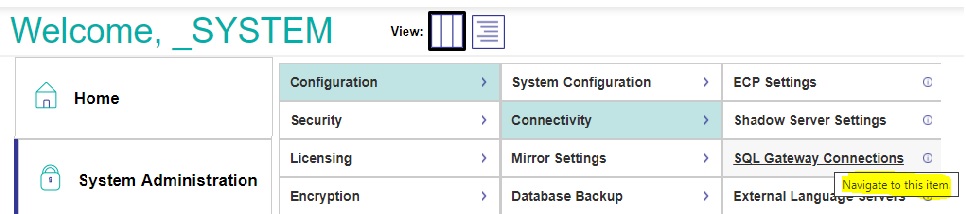
Verify the gateway connection in
SMP> Administration> Configuration> Connectivity> SqlGateway_Configuration
-
To check the connections, click edit
-
Test connection and check Connection successful
-
Be patient at this point. Sometimes DB containers (MSsql) take quite
some time to talk to you. Wait a little bit, reload the page in browser
and try the test again.
Hint:
If the problem persists Start/Stop the affected Container helps sometimes.
A missing Cache.Key requires rebuilding the Cache image or manually
adding the license on the SPM (port 57772)Know limit: For some reason MSsql container is not able to complete its
init inside the compose. Might be related to available resources. So it
has to be built separately. My interpretation. MSsql refuses competition.
-
-
Identifying the source tables. In SMP > Change to Namespace USER
then step to SMP >Explorers >SQL >Wizards > Data Migration

-
Set required import parameters
- Destination Namespace = USER
- Type = TABLE
- Select any SQL Gateway connection
- and next select a Schema from source
- Tables to migrate: as offered
-
Applying a new schema is possible, but may cause conflicts
This is one key to success:
Tables get listed alphabetically not by logical dependency or sequence.
ALso this could cause errors. -
Skipping special settings, we use defaults to start the task in background

-
Now check the results and see if everything was working without errors
You might see errors if tables depend on content not yet migrated.
And wait for completions until the status shows Done

-
We terminate the Migration Wizard and return to the normal table view
All tables are visible and show meaningful columns and contents -
Selecting a table and clicking on OpenTable shows reasonable contents
-
A look into the related generated Class Definitions confirms the result and successful completion.
Last checked by moderator
12 Jul, 2026, Works
Made with
Version
1.0.112 Jul, 2026
Category
Technology ExampleWorks with
InterSystems IRISInterSystems IRIS for HealthFirst published
11 Jul, 2026Last edited
13 Jul, 2026