
© 2026 InterSystems Corporation, Cambridge, MA. All rights reserved.Privacy & TermsGuaranteeSection 508Contest Terms

OPNEx-ECP Deployment 

5
2 reviews
0
Awards
745
Views
0
IPM installs
 0
0 0
0
Details
Releases (2)
Reviews (2)
Issues
Articles (1)
Build quickly a full ECP architecture to test your apps
What's new in this version
Github project revisited to make it work with IRIS 2025.3 and the fact that no webserver is deployed by default with IRIS. I took out WebTerminal installation as it's having some issues in 2025.1. Hopefully this is something temporary and I'll introduce it again once the issues are solved.
Application Deployment in ECP architecture
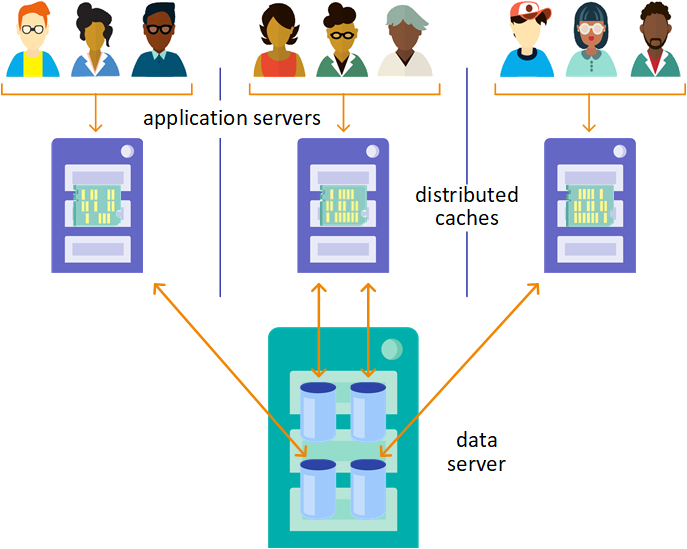
My goal with this small project was to gather and put together several pieces and build quickly a full ECP architecture where we could test our applications.
What’s in there?
By default, once you install it, it’ll launch:
- 1 ECP Data Server
- 3 ECP APP Servers connected to the ECP Data Server
- 1 Load Balancer (WebGateway configured as such) pointing at the ECP APP Servers.
- 3 WebServers, one for instance, for administration
As part of the installation, each ECP APP Server will start with the following functionalities already installed(*):
- IPM/ZPM
- Restforms2
- Restforms2-ui
- OPNEx-MModel
(*) Except for OPNEx-MModel, you can find these apps in Open Exchange
(**) The project includes the last IPM/ZPM version as of today, but it’s evolving, if you want to use the most current (when you’re playing with this) go to OpenExchange, download the xml of the IPM version you want, and replace the one included in this repo.
OPNEx-MModel could be your own app. It’s just a small sample for this project, to demonstrate IRIS features related to Multi-Model. It contains the following classes:
| Class | Description |
|---|---|
| OPNEx.MModel.Proveedor | %Persistent class with some methods to Register, Update records,… |
| OPNEx.MModel.Direccion | %SerialObject class |
| OPNEx.MModel.IOglobals | Utilities to access/record Proveedor data directly from/to the associated global. Massive data generator. |
| OPNEx.MModel.Util | Implements Limpia() method to kill the extent |
| OPNEx.MModel.RESTserver | REST Microservices to execute CRUD operations on Proveedor |
How to start
Installation
-
Clone or download this repository
-
IMPORTANT: Copy your own iris.key in ./build/ECP_iris.key. You will need a key that supports ECP. If you don’t have it you can get if from Evaluation or Preview sections in WRC (Be aware that ECP it’s not supported by IRIS Community Editions).
-
Build the server and client images (you will need access to containers.intersystems.com)
docker-compose build -
Deploy the architecture
docker-compose up -
Open your postman and import the collection:
MModelCollection.json- If you don’t want to use Postman, these are the URLs for the REST services:
Desc Method URL Search Proveedor by ID GET Sample Link Register new Proveedor (data in param) PUT Sample Link Register new Proveedor (data in body request) POST Sample Link Delete a Proveedor by ID DELETE Sample Link Update a Proveedor (data in body request) PATCH Sample Link Generates Records GET Sample Link Count Proveedores GET Sample Link Echo Test GET Sample Link
Check it’s working
-
Connect to the Loadbalancer and test that all connections with ECP clients are working (see that loadbalancer is listening in port 20080)
http://localhost:20080/csp/bin/Systems/Module.cxw- Enter with CSPsystem/SYS
- Check connections in Test Server Connection option
- Take a look at Application Access and see the call sequence to ECP client servers
-
Try to log to SMP through the LoadBalancer:
http://localhost:20080/csp/sys/UtilHome.cspYou should have currently entered in the SMP of one of the ECP clients servers, likely the first one in the round-robin queue configured in the load-balancer.
-
Try now direct access to each IRIS instance:
Client1
http://localhost:20081/csp/sys/UtilHome.cspClient2
http://localhost:20082/csp/sys/UtilHome.cspServer
http://localhost:20090/csp/sys/UtilHome.csp -
Check RestForms-UI:
http://localhost:20080/restforms2-ui/index.htmlYou should see the login page to your Restforms-ui app. Login as superuser you’ll see all the Forms you have access to. There it’s one for Proveedor class (included in this small sample) plus others that Restforms2 installs by default as an example.
If you don’t get a login page, open a new session before testing RestForms-UI. Sometimes fails, likely there is a cookie interfering, but I don’t want to spend time on fixing that as it’s just a basic sample here.
-
Check the REST services for OPNEx-MModel sample, with Postman or making use of URLs provided above
- For example, try to generate records of new Proveedores and then get one of them by ID.
- If you test Echo Test service, you will see that the request is served each time by a different APP server
To add new APP Servers
If you want to add a new APP Server:
- Edit
docker-compose.ymlfile and just Copy & Paste the declaration of one of the client services, for example “client2”, and replace service, host and container names appropiately, for example “client3”. If you want to admin that instance directly, Copy & Paste one of the “wsclientN” services, for example “wsclient2”, rename it to “wsclient3”, etc… Don’t forget also to make a copy of its related /webgatewayconfig/ws…” folder,… then, go toCSP.iniand, following with the example, replace client2 by client3 wherever you find it. - Execute
docker-compose up -d client3 wsclient3from your shell to launch the new ECP APP Client and it’s admin webserver access. - Go to LoadBalancer/WebGateway portal to add the new AppServer
- If you want to make this change permanent in your project, you should include that APP Server in
CSP.inifile in .\webgatewayconfig\loadbalancer folder (look at the content, the changes to do are pretty straightforward).
If you’re all set…
If you didn’t find any issue following the checks above, Congratulations! Your environment is ready!
Now, you can use it to demo and to develop your APP or Sample over an ECP architecture, counting with latest versions of ZPM, WebTerminal, Restforms2, Restforms2-ui. And everything “out-of-the-box”.
Happy Coding!
To get this project done I’ve made use of several other contributions from our Community/OpenExchange, so thanks to Henry Hamon Pereira who develop Restforms2 framework and Anton Gnibeda who gave Restforms2 a beautiful face, Evgeny Shvarov for building ZPM that makes thinks so easy. Specially BIG THANKS to Robert Cemper from who I borrowed IRIS-easy-ECP-workbench as a starting point, and Pierre-Yves Duquesnoy who helped me contribuiting to this project with a simple LoadBalancer configuration based on our WebGateway
Last checked by moderator
27 Jan, 2026WorksMade with
Version
1.0.102 Dec, 2025
Ideas to the app
ObjectScript quality test
PassedView reportCategory
Works with
InterSystems IRISInterSystems IRIS for HealthHealthShareFirst published
29 Dec, 2021Last edited
02 Dec, 2025