
© 2026 InterSystems Corporation. All rights reserved.Privacy & TermsGuaranteeSection 508Contest Terms


Iris Global Guard AI 

Community Project
This project is maintained by its author and is not officially supported by InterSystems. For technical support, please contact the project developer.
This project is maintained by its author and is not officially supported by InterSystems. For technical support, please contact the project developer.
0
0 reviews
2
Awards
433
Views
0
IPM installs
 0
0 Add to bundle
Details
Releases (1)
Reviews
Awards (2)
Issues
Videos (2)
Articles (1)
AI powered analysis tool for Global storage risk management
What's new in this version
Initial Release
🤖 Global Guard AI 🛡️
🔥 Enhance your InterSystems IRIS global analytics with AI.
Understand database growth, detect global trends, and perform time-aware analysis using generative AI connected directly to your system metadata — helping you optimize disk usage, namespace organization, and prevent incidents before they happen.
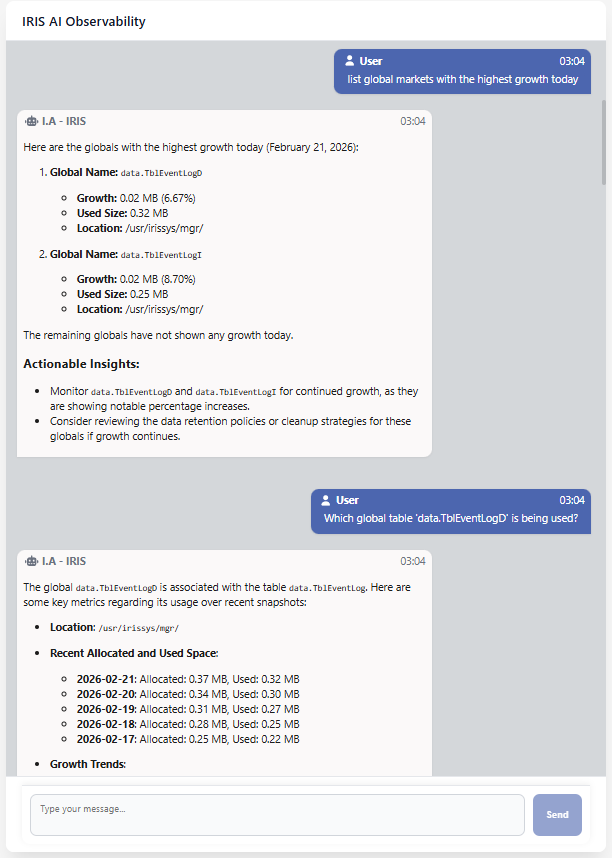
📊 Monitoring Global Health & Growth Trends
For Database Administrators (DBAs) and System Managers working with InterSystems IRIS, monitoring the health of globals is often a reactive process.
In large environments, globals may grow silently for days or weeks. When disk pressure or performance issues finally appear, identifying which specific global is responsible — or whether the behavior matches a known failure pattern — can feel like finding a needle in a haystack.
Global Guard AI is an intelligent observability tool designed to give system managers a conversational and analytical view of global behavior.
By capturing periodic metadata-based snapshots — including size, disk location, growth, and relational mapping — Global Guard AI transforms static system metrics into a time-aware knowledge base, enabling proactive analysis instead of late-stage firefighting.
❔ Example Queries You Can Ask Global Guard AI
These are real examples of questions you can execute against your InterSystems IRIS environment.
Instead of manually parsing dashboards or writing ad-hoc SQL queries, system managers can simply ask the AI agent:
Disk and Storage Analysis 💽
- 🗨️ “Show me disk usage today.”
- 🗨️ “Analyze all globals stored in the location
/usr/irissys/mgr/iristemp/.” - 🗨️ “Did any global grow more than 20% today?”
Growth and Risk Detection 📈
- 🗨️ “List globals with the highest growth today.”
- 🗨️ “Find globals with growth patterns similar to
data.TblEventLogD.” (requires vectorized data) - 🗨️ “Did any global show abnormal growth today?”
Historical Analysis 🕒
- 🗨️ “Show me the growth history of
data.TblEventLogD.” - 🗨️ “How has this global evolved over time?”
Global ↔ Table Relationships 🔗
- 🗨️ “Which SQL table is associated with the global
data.TblEventLogD?” - 🗨️ “Which globals are used by this table?”
Namespace and Location Exploration 📂
- 🗨️ “List all globals in the
USERnamespace.” - 🗨️ “List
'ENS*'globals in theUSERnamespace.” - 🗨️ “Show disk usage by location for today’s snapshot.”,
🚀 Installation
Global Guard AI is fully containerized and can be started locally using Docker Compose.
-
Prerequisites ✅
- Make sure you have the following installed:
- 🔗 git
- 🐳 Docker
- 🧩 Docker Compose
- 🔑 An OpenAI API key
- Make sure you have the following installed:
📂 Clone the Repository
-
clone Clone the git Repository
git clone https://github.com/Davi-Massaru/iris-global-guard-ai.gitcd iris-global-guard-ai
⚙️ Configure Environment Variables
-
Before starting the stack, define the
OPENAI_API_KEYenvironment variable on your machine.Linux / macOS
export OPENAI_API_KEY=your_openai_api_key_hereWindows (PowerShell)
setx OPENAI_API_KEY "your_openai_api_key_here"
⚡ Start the Application Stack
⏳ The first startup may take a while if the necessary Docker images need to be downloaded.
-
From the project root directory, run:
docker compose up --build -
Docker Compose will automatically:
- 🟦 Build and start the InterSystems IRIS container
- ⏳ Wait for IRIS to become healthy
- 🖥️ Start the Quarkus backend (AI agent + SQL analytics)
- 🗄️ Start the Angular frontend (conversational UI)
🔧 Optional – Utility Tools
Inside an InterSystems IRIS session, you can execute the following commands
in the namespace where the project was installed
(use %SYS if you are running the provided docker-compose stack):
-
Do ##class(guard.SnapshotGenerator).run()- Forces the generation of today’s snapshot.
-
Do ##class(guard.WeeklyVectorGenerator).run(90)- Vectorizes historical snapshot data considering the last 90 days of growth trends.
-
Do ##class(guard.FakerSeed).run()- Seeds synthetic data for testing and demonstration purposes.
Accessing the Services 🌐
- Once the stack is running:
- 🤖 Frontend (Conversational UI): http://localhost:4200
- 📊 Backend API (Quarkus / Swagger UI): http://localhost:8080/swagger-ui/
- 🗄️ InterSystems IRIS Management Portal: -> http://localhost:52773/csp/sys/UtilHome.csp
How Global Guard AI Works
Global Guard AI is built around a clear separation of responsibilities between data collection, analysis, and intelligence.
At the data layer, Embedded Python It is responsible for generating daily snapshots and subsequently vectorizing growth trends using Vector Search to improve analysis.
These snapshots are created using native IRIS system views such as %SYS.GlobalQuery_NameSpaceList and %SYS.GlobalQuery_Size, ensuring that no global is scanned node by node. This approach guarantees low overhead and makes the solution safe even for systems with very large globals.
Each snapshot captures metadata such as global size, allocation, disk location, namespace, and growth relative to the previous snapshot. The data is persisted in a historical table, allowing precise temporal analysis.
Once stored, snapshots can optionally be vectorized inside IRIS using vector search capabilities. This enables semantic-style comparisons between growth patterns over time, allowing the system to identify globals that behave similarly, even if their absolute sizes differ.
On top of this data, a Quarkus-based backend using LangChain exposes an AI-driven analytical layer.
The AI agent accesses IRIS through the Java Native SDK.
All interactions are strictly mediated by well-defined tools that execute predefined SQL queries against historical snapshot tables and IRIS system metadata.
Depending on the question, these tools may read previously generated snapshots and Vector Search or access native IRIS system views such as %SYS.GlobalQuery_NameSpaceList and %SYS.GlobalQuery_Size to retrieve authoritative metadata.
For security and determinism, LangChain never generates SQL dynamically and never executes arbitrary code against IRIS. Instead, the agent invokes a controlled set of Java-based tools, implemented on top of the Java Native SDK, each responsible for executing validated, read-only queries and returning structured results to the agent.
All answers are therefore grounded in real system data, retrieved exclusively through explicit native IRIS metadata.
If a requested snapshot or historical reference does not exist, the agent reports this explicitly instead of generating inferred or approximate results.
Architecture
This architecture is designed to be predictable and auditable, making Global Guard AI well suited for observability studies, capacity analysis, and controlled operational scenarios.
It is particularly appropriate for use in mirror environments, lab setups, or production systems during low-load periods, where additional analytical workloads do not interfere with critical database operations.
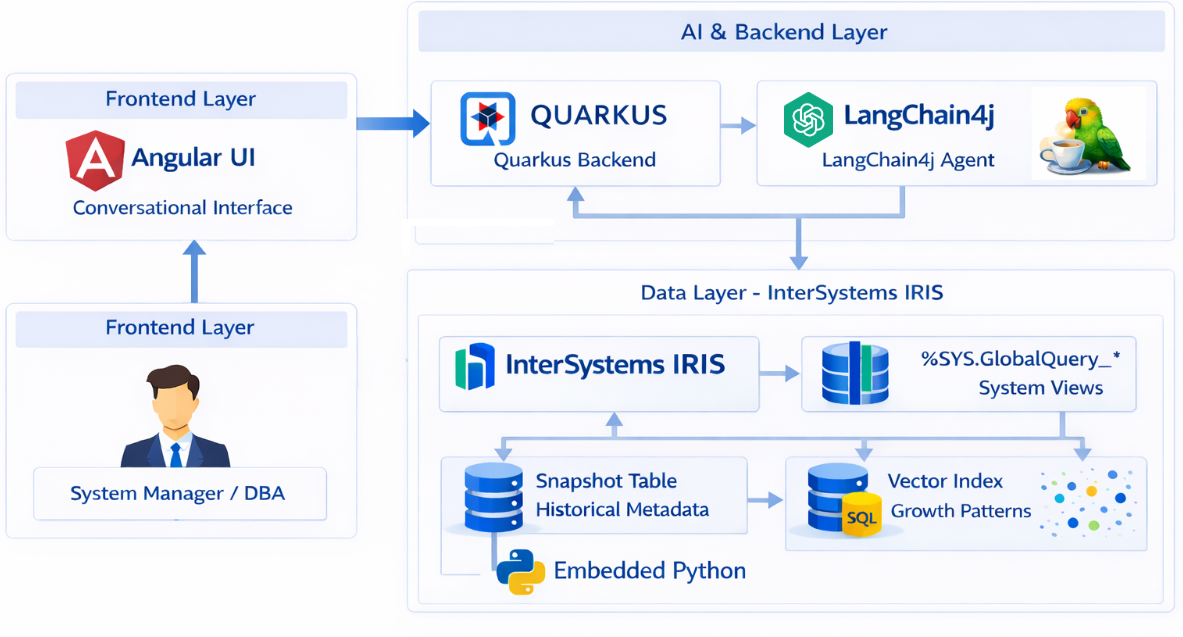
-
Daily Metadata Snapshots [Embedded Python]
Global metrics are collected once per day using native InterSystems IRIS system views (%SYS.GlobalQuery_*).
No node-by-node traversal is performed, ensuring minimal impact on production workloads. -
Historical Growth Analysis [vectorized data]
Each snapshot is linked to the previous one, enabling precise calculation of:- Absolute growth
- Percentage growth
- Disk usage evolution
- Temporal growth trends
This data is subsequently vectorized, also allowing similar queries for the last 90 days (patterned value) to query system globals that exhibit similar behaviors.
-
SQL-First Analytics Layer
All analysis is performed using explicitNative SDKSQL queries, used by IA LangChain4j TOOLs
This guarantees results that are predictable, explainable, and auditable. -
Disciplined AI Agent with Tool Calling
The conversational AI agent never guesses:- Any question involving dates, disk usage, or growth must use database tools
- All answers are generated from real system data
authors
-
- Linkedin: https://www.linkedin.com/in/davimassarumuta/
- Github: https://github.com/Davi-Massaru
- intersystems community: https://community.intersystems.com/user/davimassaru-teixeiramuta
- intersystems openexchange: https://openexchange.intersystems.com/user/Davi%2520Massaru%2520Teixeira%2520Muta/ygbBNKanLnVDa9ffzk64UznaE
-
- Linkedin: https://www.linkedin.com/in/edson-henrique-arantes/
- Github: https://github.com/edsonharantes
- intersystems community: https://community.intersystems.com/user/henrique-arantes
- intersystems openexchange: https://openexchange.intersystems.com/user/Edson%2520Henrique%2520Arantes/potC3uyVA20ca78POd7OoigLc

Last checked by moderator
09 May, 2026, Works
Made with
Install
 zpm install guard.GlobalSnapshot
  download archive
 Version
1.0.022 Feb, 2026
Ideas to the app
Category
Works with
InterSystems IRISInterSystems IRIS for HealthInterSystems IRIS BIInterSystems Vector SearchFirst published
22 Feb, 2026Last edited
23 Feb, 2026